iCertifi Check · iCertifi 12.12.92 · Cloud Pro 3.3.13
Your certificates now prove they are genuine.
Every electrical certificate you send from iCertifi carries a seal. Whoever receives it can see in seconds that it was made in iCertifi and nobody has changed it since.
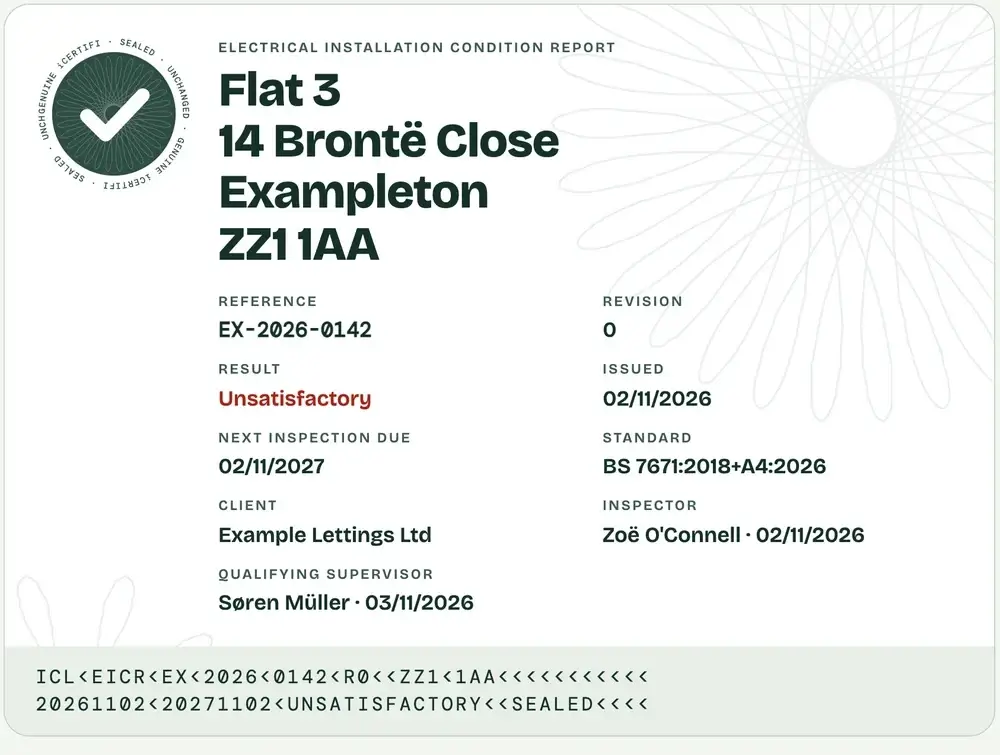
You email an EICR to a letting agent. It gets forwarded to the landlord, saved on a council case file, attached to an insurance claim. Every step of the way it is just a PDF, and a PDF looks the same whatever somebody types into it.
Until now nobody receiving it could tell whether it was the certificate you sent. The only way to be sure was to ring you. A certificate sent from iCertifi now carries its own proof, and the person receiving it can check it themselves on iCertifi Check.
Sealed as you send it
Email, share or export as usual. Your printed pages look exactly the same.
Checked in seconds
The agent, landlord or council drops your PDF on iCertifi Check: Genuine iCertifi, or Changed.
Your company checked
A limited company is checked with Companies House: real, active, and the name matches.
It has already happened.
A landlord handed Slough council an EICR for a rented house. It was a real report from a real electrical firm, for a flat in Isleworth. Someone had changed the address. It took the electrical firm checking its own records to show the report was not for that house.
the certificate provided to you has been forged
The electrical firm named on the EICR, in a witness statement to the First-tier Tribunal (Property Chamber). Decision of 28/11/2025, case CAM/00MD/HNA/2025/0608. Read the decision.
Your name and your registration are on every certificate you issue. With iCertifi, a copy that has been changed shows up as Changed the moment somebody checks it.
Genuine iCertifi, or Changed.
The agent, landlord or council goes to check.icertifi.co.uk in the browser on their computer and drops your PDF in. One certificate or a whole folder. The PDFs are read on their own computer and never uploaded, and there is nothing to install.
Change one address or one result and the seal no longer matches. Check marks it Changed, however small the edit and however good the copy.
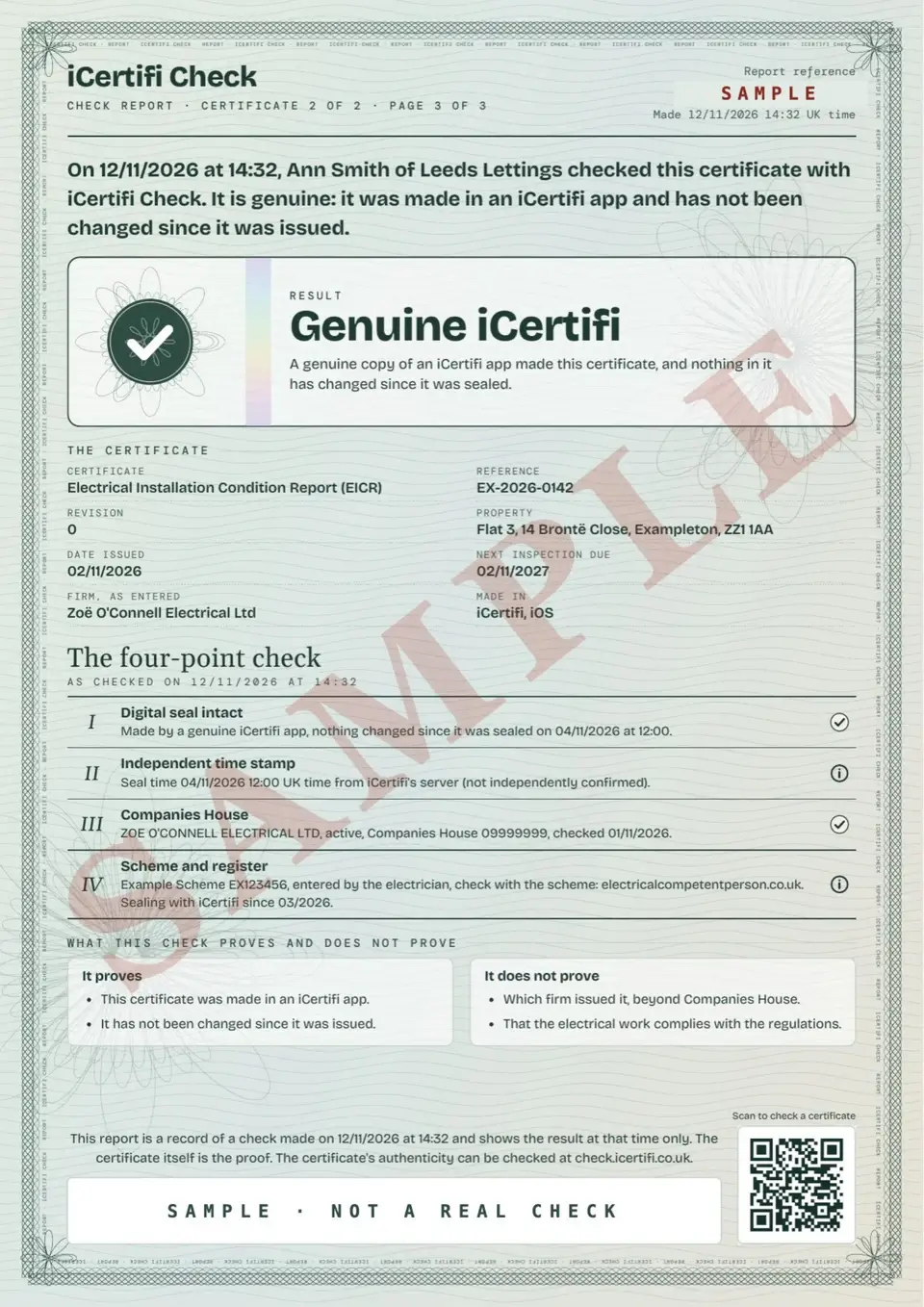
The check report they keep (sample)
- The four point check. Seal intact, the time it was sealed, Companies House, and the scheme you entered.
- A report for their file. Who checked, when, and the result in plain words, one page per certificate.
- A QR code on every page. Anyone can scan it and check the certificate for themselves.
- Straight into their system. Agents and councils can export the details to Excel, CSV or JSON, so your certificate is not typed in again by hand.
The four marks
Genuine iCertifi
Made by a genuine iCertifi app and not changed since it was sealed.
Changed
The certificate details, or the PDF itself, are not what was sealed.
Not proven yet
No seal yet. The app seals it by itself later, so it is worth checking again.
Not readable
No iCertifi seal inside, for example a certificate sent before you updated.
What Genuine means, and what it does not.
It proves
- The certificate was made in an iCertifi app.
- It has not been changed since it was sent.
It does not prove
- That the work complies with BS 7671.
- Which firm issued it, beyond the Companies House check.
That part is still your signature, your readings and your scheme. Check simply stops anybody else changing them after the certificate leaves your hands.
Two minutes, then forget about it.
After that, every certificate you email, share or export goes out sealed. There is nothing to tap.
- Update the appiCertifi 12.12.92 or iCertifi Cloud Pro 3.3.13, or later, on iPhone, iPad or Mac.
- Stay signed in to iCloudSealing needs the device signed in to iCloud.
- Contractor DetailsYour enrolment number, and your company number if you trade as a limited company. Sole traders leave the company number blank. Your company is then checked with Companies House for you.
- Settings, iCertifi CheckChoose your scheme. On a Cloud Pro team the firm owner sets these for the whole firm.
Older certificates can be sealed too.
Once you are on the new version, every certificate you send goes out sealed, including ones you made before you updated.
- Open the certificate and go to its PDF preview.
- If the app shows the issued PDF, tap Revise first. Otherwise it goes out as it was first sent, without a seal.
- Send it again by email, share or export, as usual. Check now shows Genuine iCertifi.
No signal in the loft? The PDF still goes. The app seals it by itself later, when it is back online, and you do not need to send it again. Until then Check shows it as Not proven yet.
Questions electricians ask
Does the seal change how my certificate looks?
No. The printed pages stay exactly as they are. The seal travels inside the PDF.
What should I tell my letting agents?
Send them icertifi.co.uk/icertifi-check. It explains Check for the people receiving certificates.
Send your next certificate sealed
Update from the App Store, then add your scheme and company number.