
Gas Cert for iPhone, iPad, Mac & Android
The gas certificate app built for Gas Safe engineers
30 UK gas, oil, heating and heat pump certificates, from the CP12 landlord record to heat pump commissioning. Filled in on site, signed on screen, emailed before you leave the drive. Client Hub, automatic customer reminders and gas calculators built in.



Client Hub
Every landlord and agent, with their properties
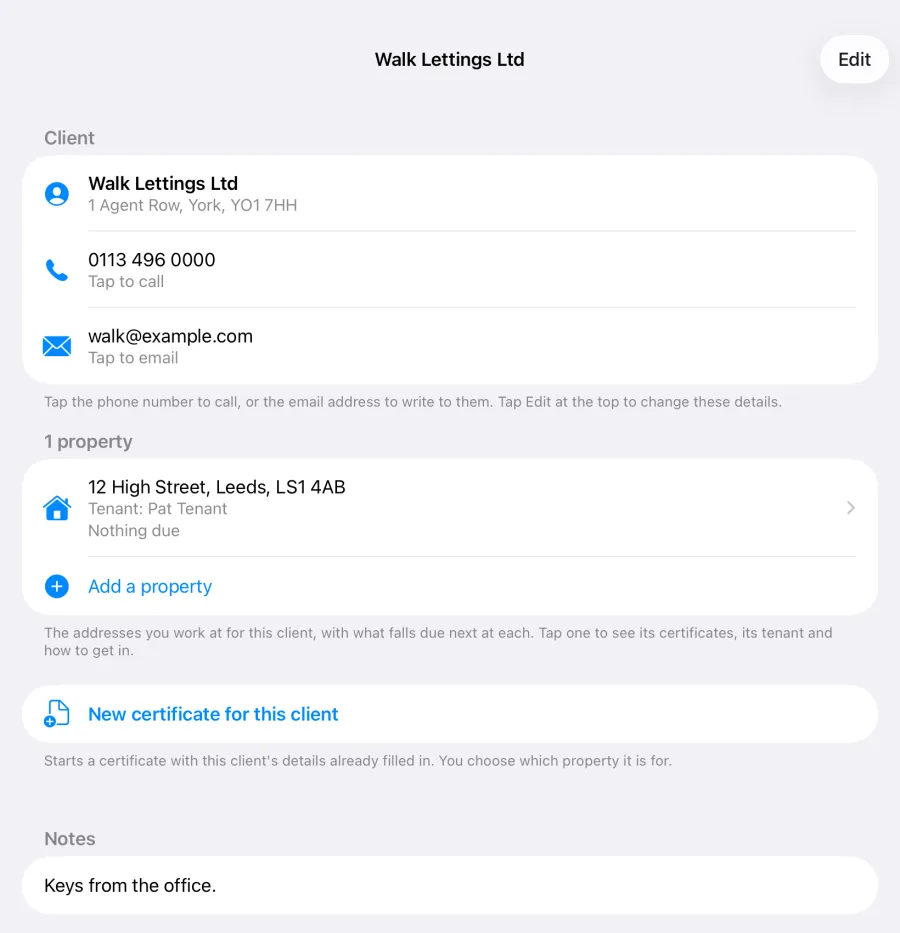
Client Hub keeps your landlords, letting agents and customers in one place, each with the properties you work at for them. Open a property to see its certificates, the tenant and how to get in.
- Clients are added for you when you save a certificate with a landlord or client name on it
- Start a new certificate from a client or a property and the client, property, tenant and access notes are already filled in
- Tap to call or email the client, or phone the tenant, straight from the app
- The What’s due tab lists what needs doing next, across every client
Client Hub is part of the Gas Cert subscription.
Every certificate
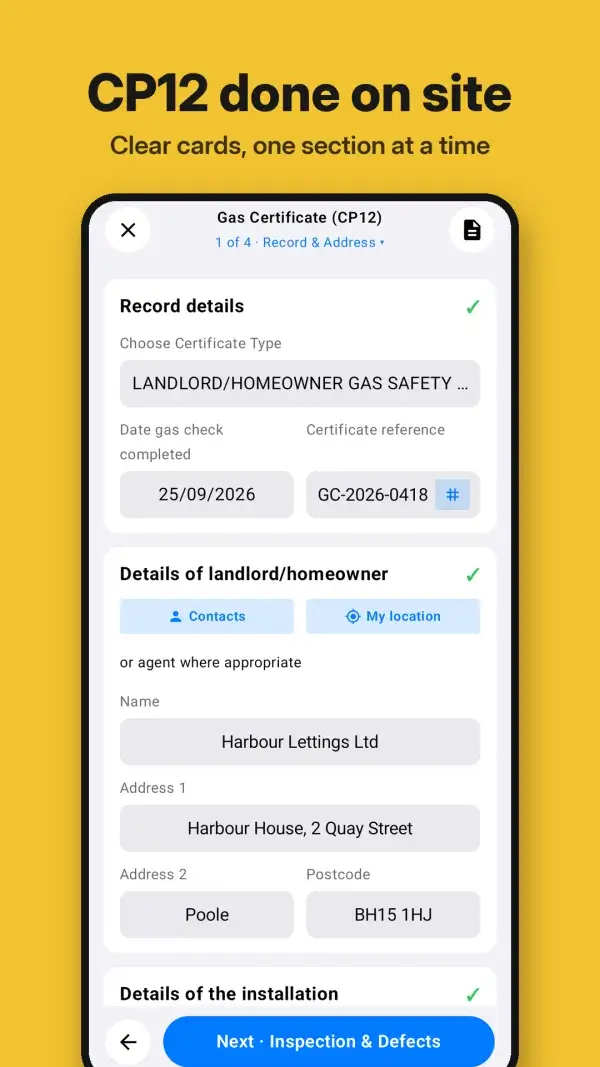
Clear cards, one section at a time
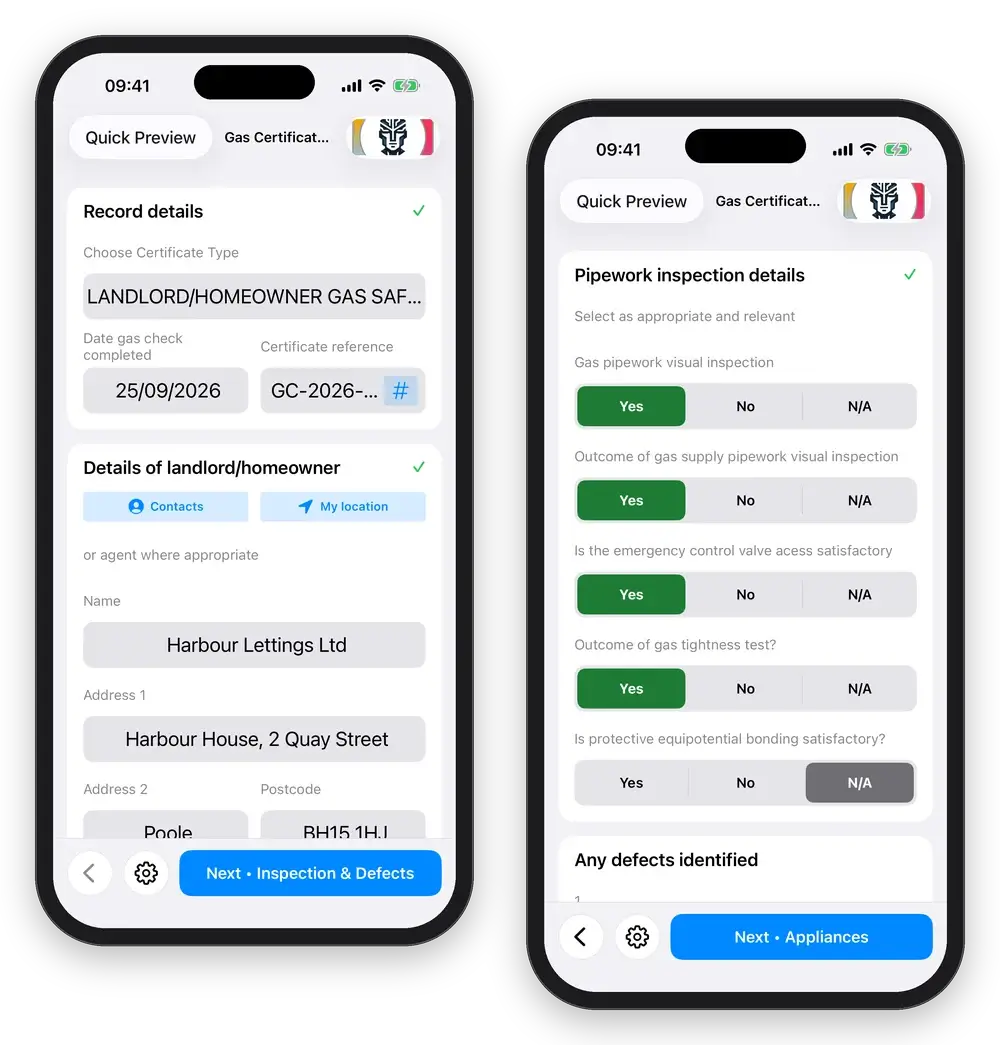
Every certificate opens as a set of cards, one section at a time, with a green tick as each section is filled in. The bar along the bottom tells you which section comes next.
- Yes, No or N/A in one tap on every check, with no list to scroll through
- Contacts, My location and Copy address fill the addresses for you
- Back, the Certificate menu and Next, always in the same place at the bottom of the screen
Built for iPad
A checklist down the side of every certificate
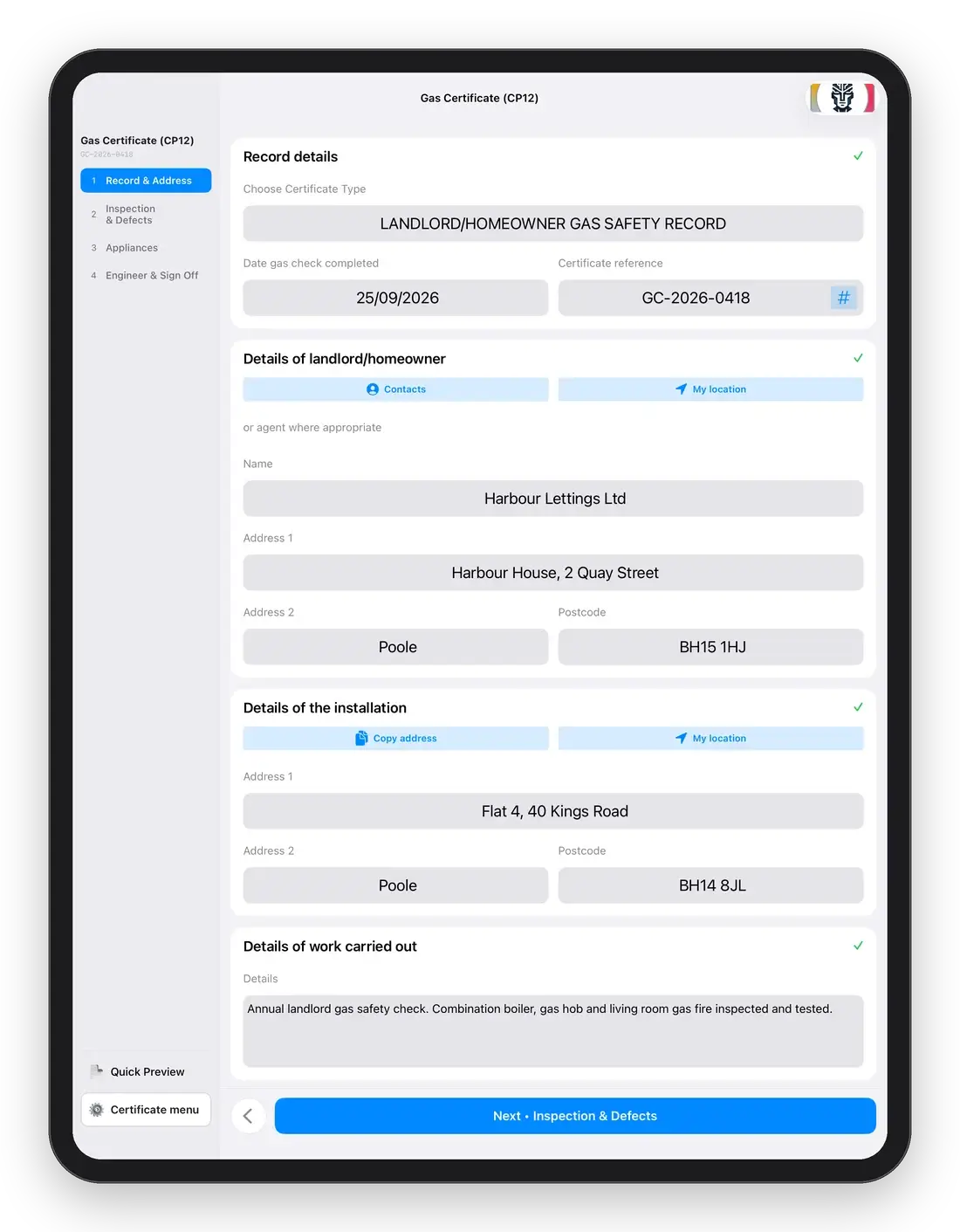
On iPad every certificate has a sidebar listing its sections. Tap a section to jump straight to it, and see where you are at a glance.
Quick Preview and the Certificate menu sit at the foot of the sidebar, so the finished record is always one tap away.
Appliances and Dark Mode
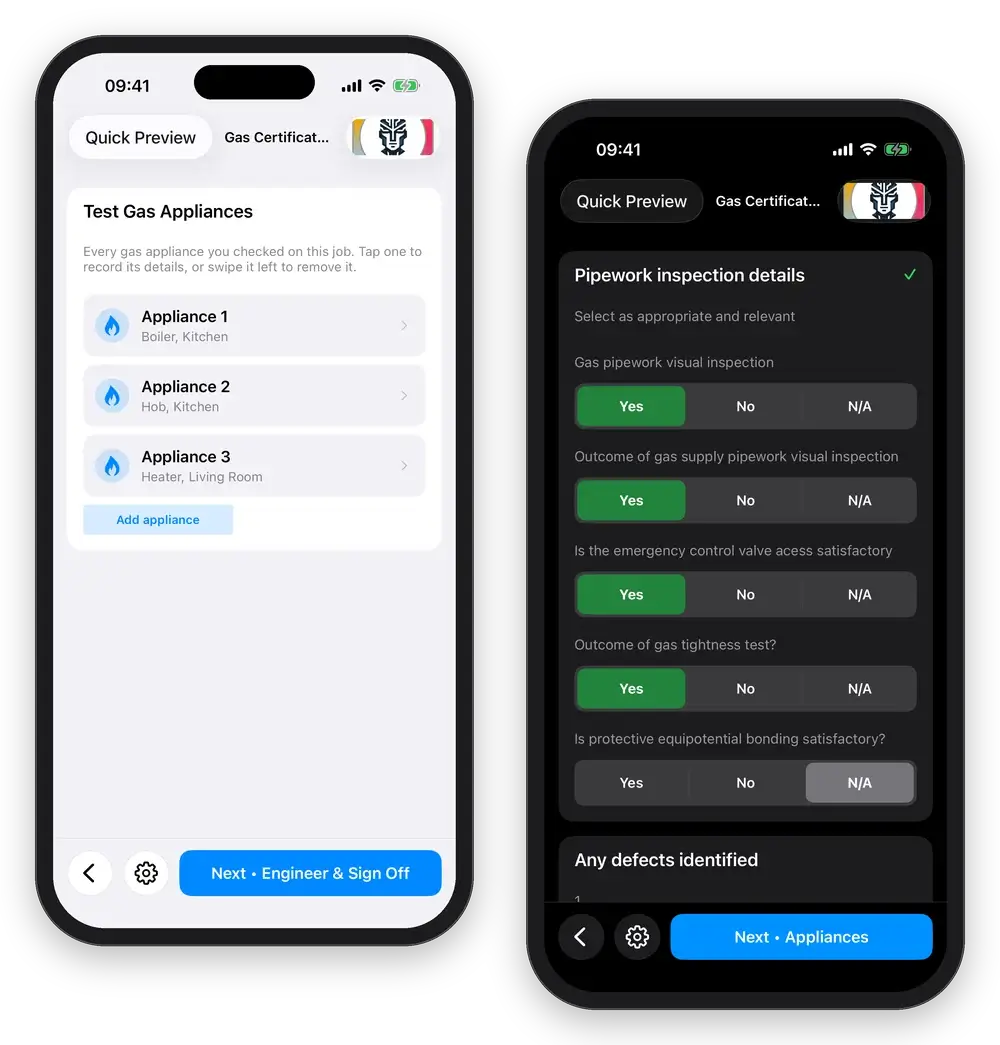
Every appliance on one card
Each gas appliance you check is listed on the CP12 with its type and where it is. Tap one to record its details, or swipe it left to remove it. A CP12 records up to five appliances, the same as the form.
Every screen reads properly in Dark Mode too, for the loft, the cupboard and the evening paperwork.

Every certificate
Every gas safety certificate in one app: domestic, commercial, LPG, oil, heating and heat pumps
Digital gas certificates for every job: 30 of them, including four heat pump commissioning records. Search by code or name, or browse by the type of work, and start any certificate in a couple of taps.
CP12 in minutes
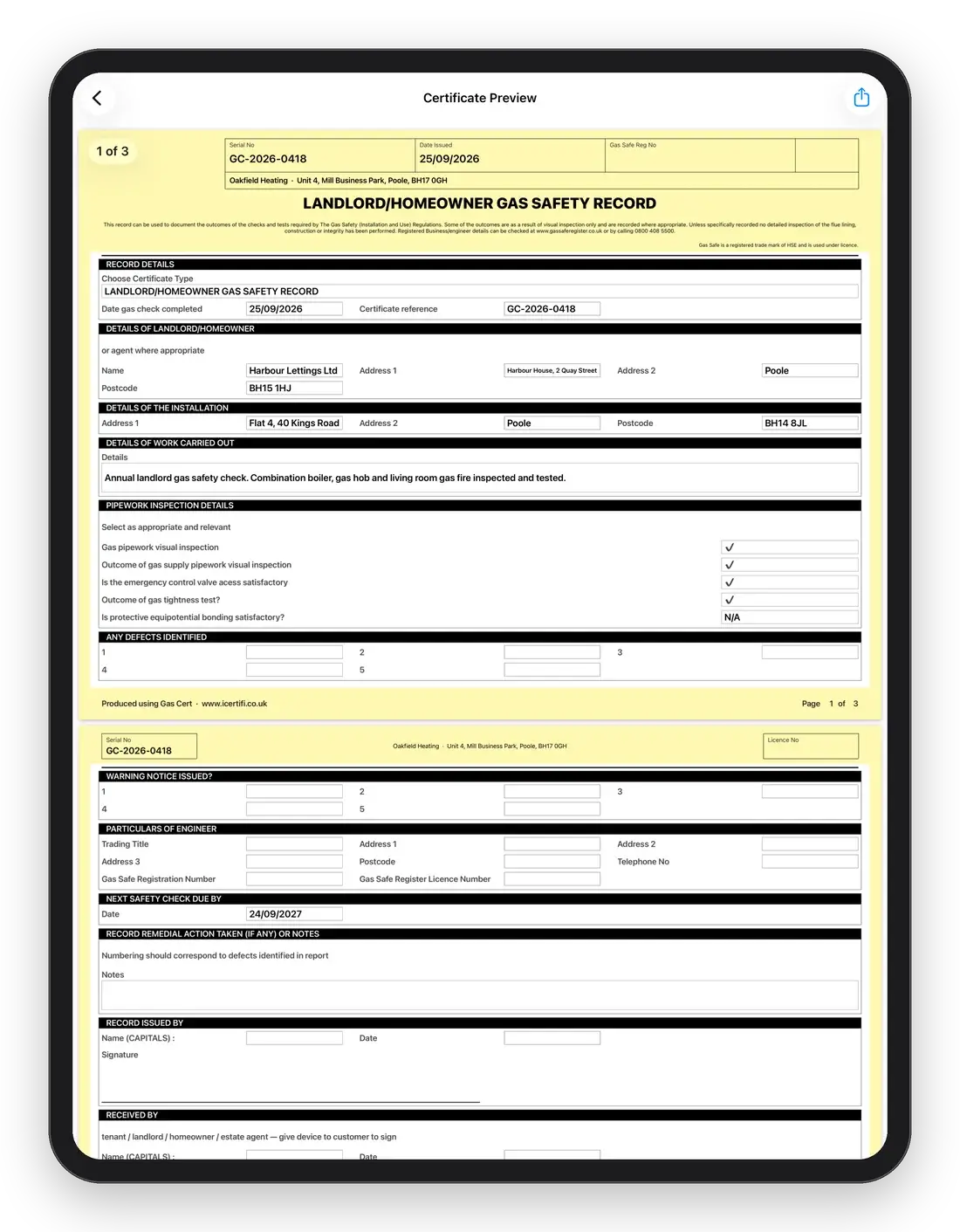
A gas safety certificate PDF, emailed before you leave
Enter the property, landlord and appliance details once. Record the checks, add defects and advice, take a signature on screen, and Gas Cert lays it all out as a clean, print-quality gas safety certificate PDF that your customers can actually read.
- Smart autofill carries customer, property and appliance details between certificates
- Yes, No and N/A in a single bar on every check: one tap to answer, no scrolling a list
- Digital signatures for engineer and customer
- Duplicate last year’s certificate with a swipe and just update the results
- Email or share the PDF straight from the app, the moment the job is done
- Every certificate saved, searchable and backed up

An assistant trained on UK gas engineering, not the whole internet
GasAI is built into Gas Cert and trained on boiler manuals, fault codes, installation and servicing procedures and UK gas regulations including GSIUR, IGEM/UP/1, IGEM/UP/2 and BS 6891. Ask it on site and get a straight answer while the certificate is still open.
GasAI supports the engineer’s judgement. It does not replace it, or the Gas Safe Register.
A real GasAI answer, shortened.
Fault codes
Manuals
Procedures
Regulations
AI Appliance Assessment
AI on the keyboard

Gas calculators
Gas rate, pipe sizing, heat loss, ventilation and flue positions
The calculations you do on every job, one tap from the home screen. No more separate calculator apps or scribbling on the back of a notepad.
- Gas rate: kW from the meter reading
- Pipe sizing: size gas pipework for the installation
- Heat loss: calculate boiler size
- Ventilation: air requirements for the appliance
- Flue positions: terminal distances
Never miss a renewal
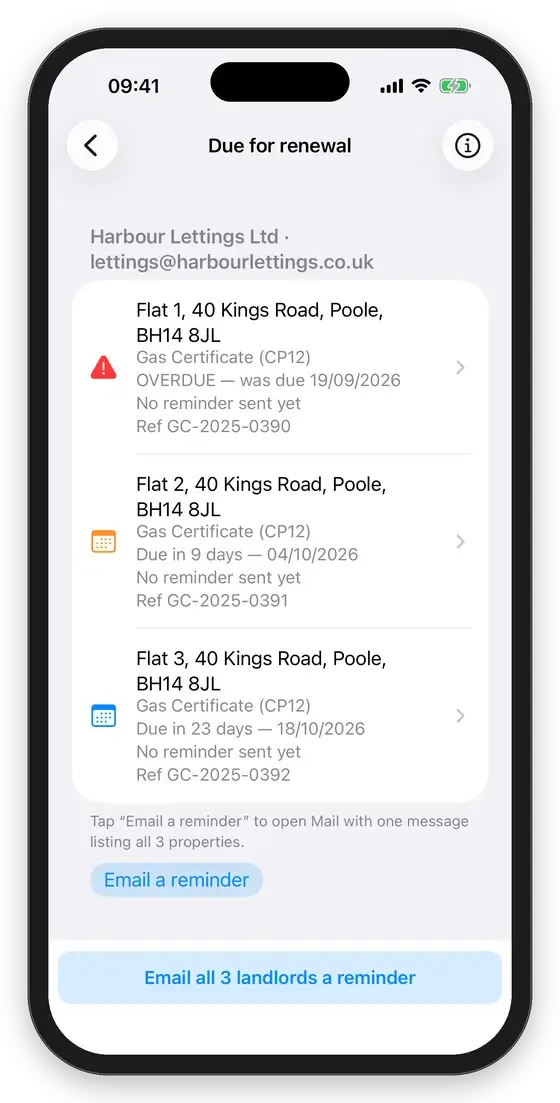
The certificates coming up, grouped by landlord
Repeat work is the easiest work to lose. The Due for renewal screen lists the certificates approaching their next due date and groups them by the landlord or agent they belong to, so you deal with an owner once instead of property by property.
- Overdue certificates are flagged in red
- One tap emails that landlord a single reminder listing every property that is due
- Covers every certificate type with a next due date, not just the CP12
- A card on the home screen shows what is due before you go looking
- What’s due in Client Hub: one list of every certificate coming up, across every client
- Switch on an automatic reminder and your customer is emailed for you before it is due
Automatic customer reminders
Customers reminded. Your diary, filled.
Switch on a reminder for any certificate and Gas Cert emails your customer before it is due, so they book you in again. No chasing, no spreadsheet of due dates.
-
Sent in your business nameWhen the customer replies, it goes straight to your own email.
-
You choose how early14, 30, 45 or 60 days ahead, set once in Settings.
-
Never too early for a landlordA landlord gas safety check can be done up to two months early without losing its date.
-
Only who you chooseCertificate by certificate. Customers can stop reminders with one tap, and you can turn one off any time before it goes.
-
No extra chargeIncluded with your Gas Cert subscription.
To set one: open a certificate, go to its next due date and tap Remind customer.
14 Oak Lane, CP12 Checked Jul 2026
Reminder: the Gas Certificate (CP12) for 14 Oak Lane is due on Wednesday 14 July 2027.
Example. Names and dates are made up.
Invoicing without retyping on iPhone, iPad & Mac
Finish the certificate. The invoice is already written.
Link Gas Cert to Mint Books, the UK bookkeeping and invoicing app for trades, and every certificate you complete turns into a draft invoice with the customer and the job already on it. Add your price and send it, usually before you have left the drive.
- Customer, property and certificate type carried straight onto the draft, so you never type them twice
- It stays a draft until you review it, so nothing reaches a customer without you
- Certificates finished with no signal queue up and sync the moment you are back online
- Pairs in seconds with a six-character code from your Mint Books account
- VAT, CIS and Making Tax Digital handled on the Mint Books side

Draft
iPhone, iPad & Mac
Start on the phone. Finish on the iPad. Invoice from the Mac.
On Apple devices, certificates sync automatically and securely between your iPhone, iPad and Mac through iCloud, with end-to-end encryption. The dashboard shows what is unfinished, what has not been sent and what is due for re-inspection in the next 90 days.
- Full offline working: complete certificates in the plant room or basement with no signal; changes sync when you are back online
- Backed up: lose or replace your device and your certificates are still there
- Mac app: Apple silicon (M1 and later)

On Google Play
Gas Cert for Android
Gas Cert is on Android phones too, with the same certificates as the iPhone. Fill in the CP12 on site, take the signature on screen and email the PDF before you leave the drive.
- All 30 certificate types, including the heat pump commissioning records
- Client Hub, What’s due and automatic customer reminders
- The five gas calculators
- Works offline, with a backup you can keep on Google Drive or wherever you choose
- Its own subscription through Google Play
Syncing between devices, GasAI and Mint Books invoicing are on iPhone, iPad and Mac only. Certificates made on Android stay on that phone and do not sync with Apple devices.
Who it is for
A gas certificate app built for engineers, not the office
Gas Safe engineersSole traders issuing a handful of CP12s a week who want them done on the drive, not at the kitchen table.
Heating & boiler companiesTeams doing installs, Benchmark and heat pump commissioning and servicing who need consistent, professional paperwork.
Landlord & letting-agent workHigh volumes of landlord gas safety records, every landlord and agent in Client Hub with their properties and tenants, and automatic reminders so they book you again.
Commercial & non-domesticCP16, testing and purging and commercial reports alongside the domestic range.
LPG, caravans & boatsLeisure-industry gas safety records in the same app.
Oil & OFTECOil-fired installation and servicing certificates for engineers who do both.
Gas certificate software
Gas certificate software that lives in your pocket, not on the office PC
Most gas certificate software means going back to a laptop at the end of the day. Gas Cert runs on the iPhone, iPad, Mac or Android phone you already own, so the CP12 is filled in at the property, signed on screen and emailed as a PDF before you leave the drive.
- A gas safety certificate PDF on the spot, ready to email or share
- Your company name and address printed on every page
- Works fully offline in the plant room or basement
- 30 certificate types, 5 gas calculators, Client Hub and automatic customer reminders
How it works
Create a CP12 in Gas Cert
- Open Gas Cert and tap New Certificate.
- Choose Gas Safety Record (CP12).
- Enter landlord, tenant and property details (or autofill from a previous visit).
- Record each appliance, then answer the safety checks: Yes, No or N/A in one tap.
- Complete tightness test, ventilation, flueing checks and any defects.
- Sign, generate the PDF and email it to the landlord or agent.

FAQ
Frequently asked questions
Is Gas Cert compliant with UK gas safety requirements?
Yes. Gas Cert is built for UK Gas Safe engineers and follows the required formats for the Landlord Gas Safety Record (CP12), warning notices, service and breakdown reports and the other certificates it produces.
Does Gas Cert work offline?
Yes. Complete certificates without a data connection. Everything is saved on the device. On iPhone, iPad and Mac it syncs through iCloud automatically when you are back online; on Android it stays on the phone and is included in Android backup.
Can I send certificates to customers straight away?
Yes. Generate the PDF and email or share it from the app as soon as the certificate is signed.
Which devices does it run on?
iPhone, iPad and Mac (Apple silicon, M1 and later), with your certificates syncing between them, and Android phones. Certificates made on Android stay on that phone and do not sync with your Apple devices.
What is the best app for issuing gas safety certificates?
The right app is one that covers every certificate you issue and lets you finish it at the property. Gas Cert has 30 gas, oil, heating and heat pump certificates, including the CP12 landlord gas safety record, takes the signature on screen and emails the PDF from the job. It runs on iPhone, iPad, Mac and Android, so you can try it on your next CP12 with the phone you already carry.
Can I do a landlord gas safety certificate (CP12) on my phone?
Yes. Open Gas Cert, tap New Certificate and choose Gas Safety Record (CP12). Fill in the landlord, property and appliance details, answer each check, take both signatures on screen and email the PDF to the landlord or agent before you leave.
Is Gas Cert available on Android?
Yes. Gas Cert is on Google Play for Android phones, with its own subscription through Google Play. It has the same certificates as the iPhone, including the heat pump records, plus Client Hub, What’s due, automatic customer reminders and the gas calculators. The Android app works on its own: certificates stay on the phone, you can save a backup to Google Drive or wherever you choose, and they do not sync with the iPhone, iPad or Mac version. GasAI and Mint Books invoicing are on iPhone, iPad and Mac only.
What is GasAI?
GasAI is the assistant built into Gas Cert. It is trained on boiler manuals, fault codes, servicing procedures and UK gas regulations so it can answer questions on site while you work. It is there to support the engineer’s judgement, not replace it.
Can I duplicate last year’s certificate?
Yes. Swipe a certificate to duplicate it, leaving the original untouched, then update the results for this year’s visit.
Can Gas Cert create my invoices?
Yes, through Mint Books. Link the two apps once and every certificate you complete arrives in Mint Books as a draft invoice with the customer, the property and the certificate type already filled in. Add your price, check it and send. More about the Mint Books integration.
How do I keep track of when certificates are due?
The Due for renewal screen lists the certificates coming up for renewal, grouped by landlord or agent, and one tap emails that landlord a reminder covering every property of theirs that is due. The What’s due tab in Client Hub lists everything coming up across every client, and a card on the home screen shows what is due without you going looking.
Can Gas Cert remind my customers when a certificate is due?
Yes, for subscribers. Switch on a reminder for any certificate and your customer gets an email from your business before it is due, so they book you in. Choose 14, 30, 45 or 60 days ahead in Settings, Customer reminders. Replies go straight to your email, your customer can stop reminders with one tap, and there is no extra charge.
Does Gas Cert do heat pump commissioning records?
Yes. Gas Cert has Air to Water, Ground Source and Air to Air heat pump commissioning records, plus a Heat Pump Commissioning and Performance Record.
What is Client Hub?
Client Hub keeps your landlords, letting agents and customers in one place, each with the properties you work at for them. Clients are added for you when you save a certificate with their name on it, and a new certificate started from Client Hub fills in the client, property, tenant and access notes for you. Its What’s due tab lists every certificate coming up for renewal. Client Hub is part of the Gas Cert subscription.
Do I need gas certificate software on a computer as well?
No. Gas Cert is complete CP12 and gas certificate software on its own. It runs on iPhone, iPad and Mac (Apple silicon, M1 and later), and your certificates sync between them, so you can start on the phone and finish on the iPad or Mac. It is also on Android, where certificates are kept on the phone.
Can I send a gas safety certificate as a PDF?
Yes. Once the certificate is signed, Gas Cert makes a PDF you can email to the landlord, agent or tenant, or share straight from the app.
How much does Gas Cert cost?
See the pricing page for subscription options.

Try Gas Cert on your next job
Download it, open a CP12 and see how quickly it comes together.
Gas Cert is a gas safety certificate app for UK Gas Safe engineers: CP12 landlord gas safety records, service and breakdown reports, warning notices, commissioning checklists, heat pump commissioning records and more on iPhone, iPad, Mac and Android.