| ✓BS 7671:2018+A4:2026Compliant |

iCertifi Cloud Pro
Cloud Electrical Certification App for UK Contractors &
Teams
iCertifi Cloud Pro is a powerful Apple-native cloud electrical certification app built for UK electricians, electrical contractors, and multi engineer firms. Create, manage, and store BS 7671 compliant electrical certificates – EICs, EICRs, and more – with real offline working, automatic cloud sync across all devices, QS remote sign-off, and team collaboration tools. The smarter way to run electrical certification at scale.


Cloud Sync Across All Your Apple Devices
Secure – Synced – Backed Up
Electrical certificates are automatically and securely backed up to the cloud with end-to-end encryption and advanced privacy protection. Your BS 7671 certificate data is always safe.
Work seamlessly across all your Apple devices – start on iPhone on site, continue on iPad, finish on Mac in the office.
Even if your device is lost, replaced, or the app is deleted, your electrical certificate data stays safe, synced, and accessible when you need it.

Full Offline Working
No Signal Required
Complete BS 7671 electrical certificates anywhere – even without a data connection or mobile signal
All test results and certificate data are saved locally on your device as you work
Back Online?
iCertifi Cloud Pro Will:
Automatically sync all changes to the cloud, instantly updating across every device in your team

Duplicate Electrical Certificates Instantly
Duplicate any BS 7671 electrical certificate in seconds for blazing-fast electrical certification on repeat jobs.
Smart Duplication
Choose to duplicate certificates including DB board schedules with or without test results – perfect for similar installations. Combined with built-in electrical certificate templates, iCertifi Cloud Pro eliminates repetitive data entry across every job.
Simple & Fast
Simply swipe, tap, and your certificate is duplicated leaving the original untouched

QS Remote Sign-Off for Electrical Contractors
QS Monitoring, Review & Signing
Qualified Supervisors (QS) can remotely view, sign, and correct errors on electrical certificates in real time – no need to be on site
*Full QS dashboard with sign-off, correction tools, and complete audit trail
(*Enterprise subscription required)

Spark AI – Built-In Electrical AI Assistant
AI-Powered Technical Helpline for Electricians – Available 24/7
Spark AI is trained across all aspects of the electrical regulations, BS 7671, EICR codes, inspection and testing procedures, and electrical contracting. It combines the knowledge of your manuals, textbooks, and technical helpline into one accessible platform – available any time, on any job. Spark AI delivers instant, human-like answers without relying on predefined responses.
Free 7-Day Trial
Try iCertifi Cloud Pro completely unrestricted for 7 days – no commitment required. Full access to cloud sync, QS tools, AI assistant, and all BS 7671 certificate types.
Board Vision. AI Distribution Board Scanner for Electricians
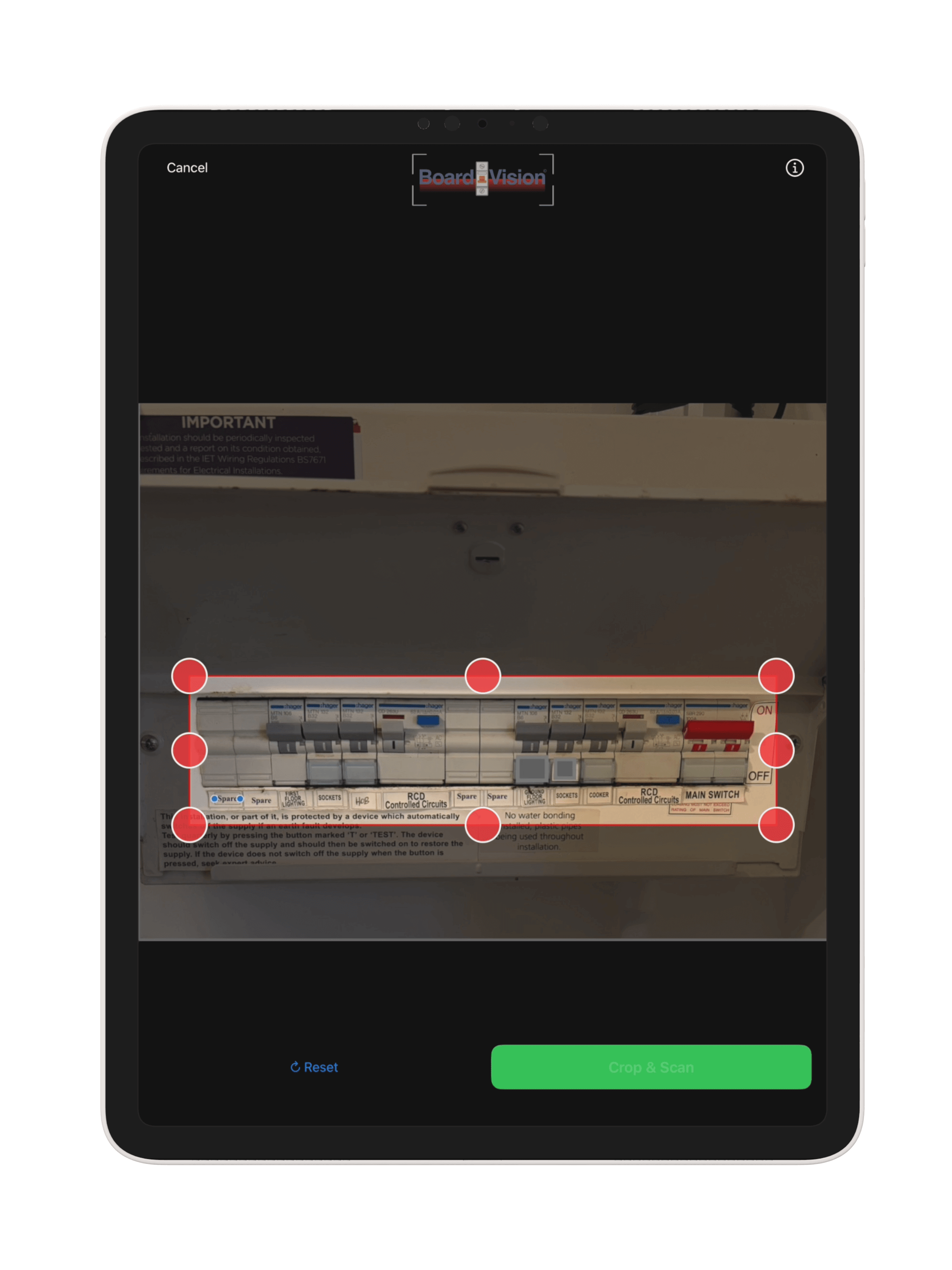
BoardVision sees what takes you hours. Photograph a distribution board and it captures all the circuit information for you.
-
Point your camera at the fuse board. It identifies circuits, layout, MCBs, RCBOs and RCDs.
-
DB boards, PDFs, paper schedules and photos. Board Vision reads them all and builds your full distribution board schedule in seconds.
-
Straight into the certificate. All data is transferred directly into the electrical certificate, with no manual circuit entry.
See Board Vision at work
Automatic DB Schematic. See what feeds what.
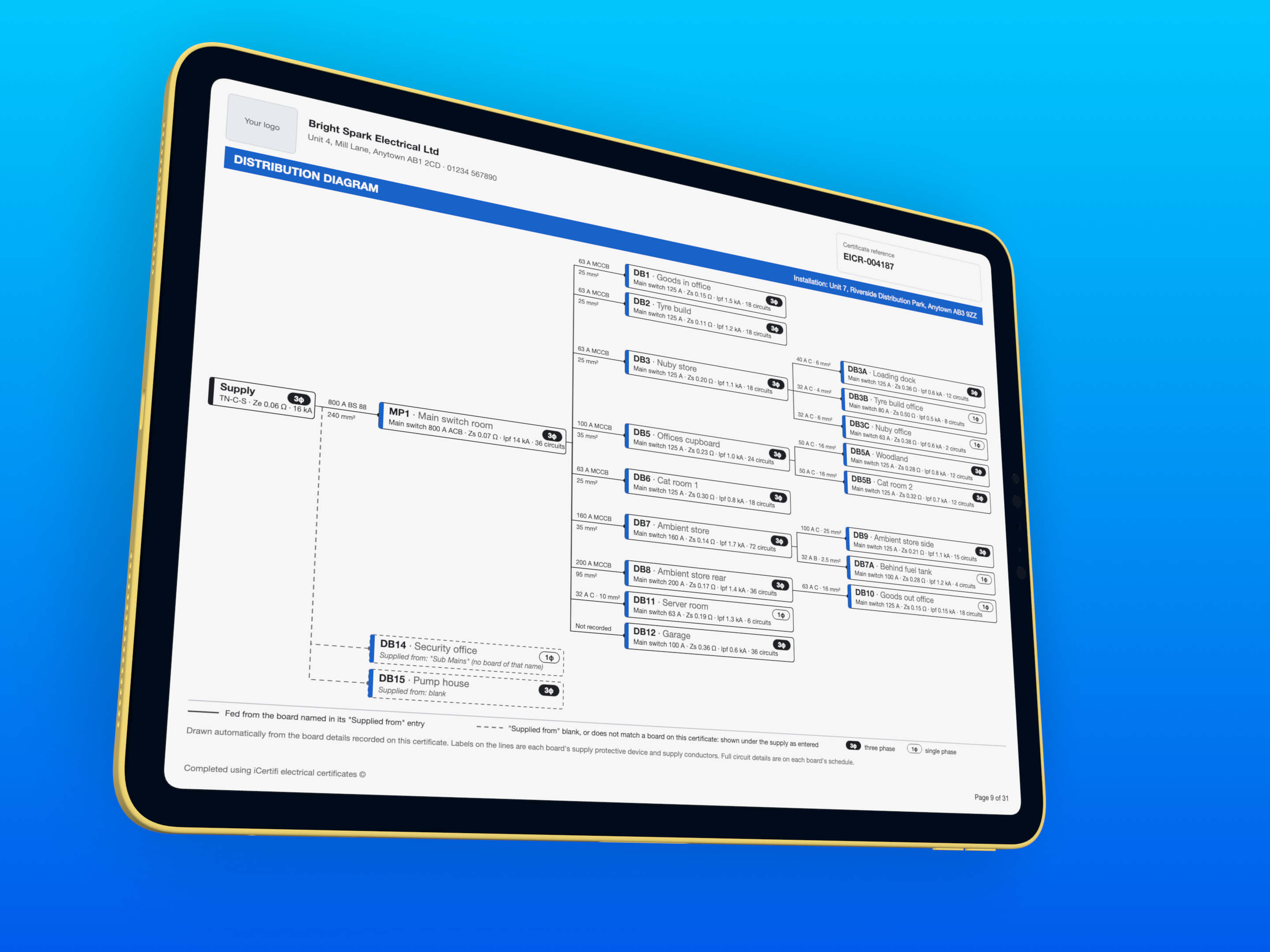
Every certificate with two or more boards can carry a distribution diagram: the supply, every board and the board that feeds it, drawn for you on its own PDF page.
-
Nothing new to fill in. It is drawn from each board’s Supplied from box, with the supply device and cable size on every line.
-
Gaps show up. A blank or unmatched link is drawn as a dashed line, and Check board links suggests the missing ones from your circuit names.
-
EICR, EIC, Domestic EIC and EV Charger Point. Turn on Board Diagram in Settings, or for one certificate from its cog menu.
Turn it sideways. Get the circuit chart.
Upright, you fill in one circuit at a time. Turn your iPad or iPhone sideways and the board becomes a traditional schedule of test results: one row per circuit, every column the schedule prints, and any box ready to fill in.
-
Both ways, same circuits. Type in the chart, turn back upright, and the circuit page shows it.
-
Straight down the column. Return moves to the next circuit and skips spares. N/A, Lim and Clear sit on the keyboard bar.
-
Checked as you type. Out of range readings turn orange or red, and Maximum permitted Zs follows the breaker.
Certificates from another app? Import the PDF.
Moving to Cloud Pro, or taking over a job another firm certified? Import PDF reads a certificate made in another app or software and turns it into a Cloud Pro certificate for you to check and finish.
-
Boards, circuits and readings. The client, installation and supply details, and every board, circuit and test reading on the schedule. Make it an EICR, EIC, Domestic EIC or Minor Works.
-
You check before it imports. Any reading the PDF gave two different answers for is shown for you to pick or type. Tick boxes, observations, the earthing type and the overall result are left for you to fill in.
-
10 imports free. Whatever their size. After that each circuit uses 1 AI token, the same as Board Vision. Tap the cog in Saved Certificates, then Import PDF.

From observation to the repair certificate.
Coded a C1, C2, C3 or FI on an EICR? Tap Certificate for this repair on the observation and choose the certificate the work needs. It starts filled in from the EICR.
-
Minor Works, EIC or Domestic EIC. Minor Works for a repair to one circuit you pick. EIC or Domestic EIC for a new consumer unit, new circuits or a rewire, copying the boards and circuits (names, cables and wiring) or starting with an empty board.
-
Nothing typed twice. The client, address, contractor, supply and earthing details come from the EICR, with a description of the work taken from the observation.
-
The EICR stays as it is. Test results, protective devices, dates and signatures are left blank for the new work, and the new certificate is saved alongside the EICR.

iCertifi & MintBooks Certificate done. Invoice done.
The second you save a certificate, MintBooks builds the invoice. You do the electrics, the paperwork does itself.
-
Finish the certificate. Complete your EICR, minor works or any cert in iCertifi like you always do.
-
Tap save. That is your only extra step. No signal on site? It queues and syncs the moment you reconnect.
-
MintBooks builds the draft. Client, property and price arrive as a ready-to-send draft invoice. Matched by reference number, so it never duplicates.
-
Check it, send it, get paid. Tweak pricing or add a line if you want, then send. Nothing leaves without you.
Link iCertifi to MintBooks and stop typing the same job out twice.
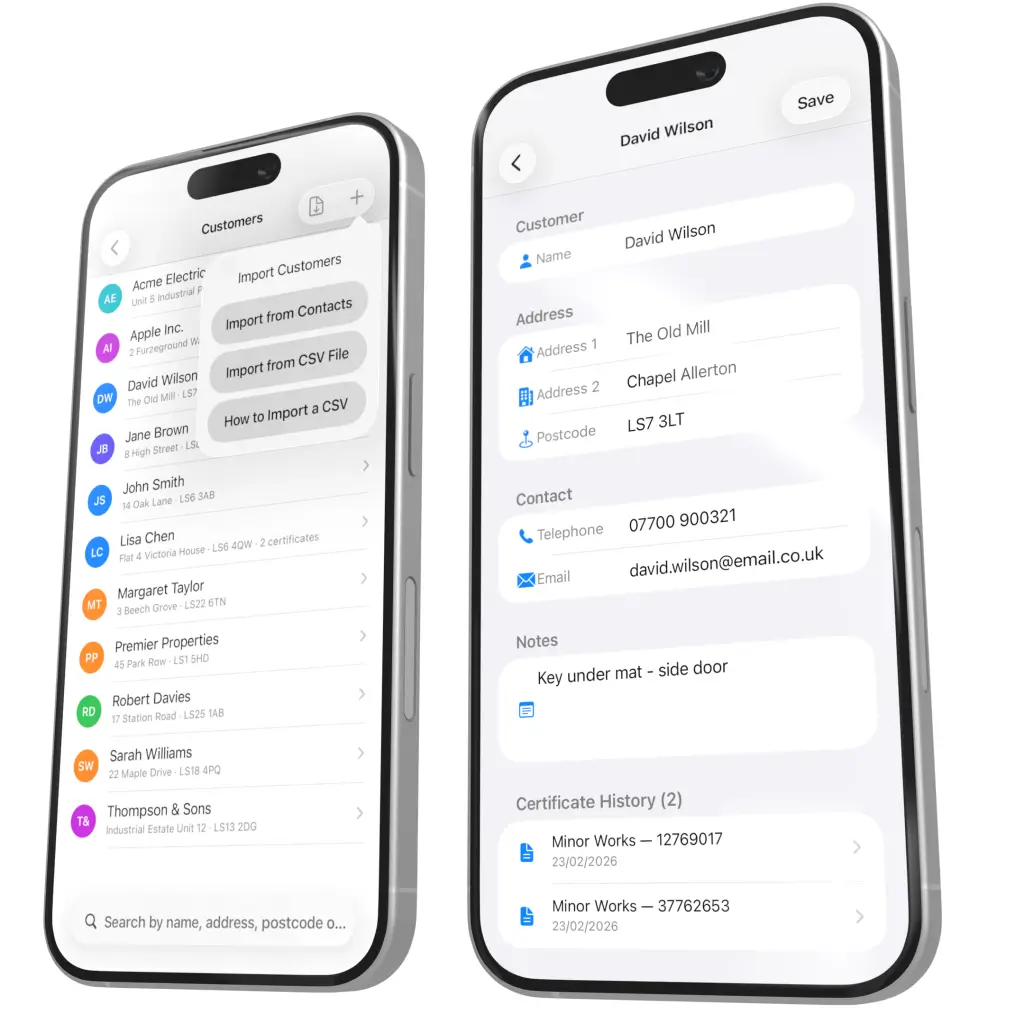
Built-In Customer Database Every Client. Every Certificate. One Place.
Keep your clients organised and all their certificates connected, so any engineer in your team can find, open and manage any job in seconds.
-
Bring your client list with you. Add clients manually, or import your existing list via CSV.
-
No double entry. Pull a client into any certificate.
-
Their whole history on one record. Every BS 7671 electrical certificate ever raised for them.
Your clients. Your certification history. Always at your fingertips.
Certificate Automations Set It and Forget It.
Build your own workflows that run as you complete certificates. Choose a trigger, set conditions, define the action.

Remote QS Sign-Off and Audit Trail for Electrical Contractors
Engineers complete the work on site. Your Qualified Supervisor reviews and signs off from anywhere: office, home, or another site.
-
Submit from site. The engineer records the test results and submits the certificate for QS approval.
-
Instant notification. The QS can view the full certificate, the test results and the submitting engineer’s details.
-
Check, approve, and sign. Review and sign off completed certificates directly in the app.
-
A full audit trail. Who created, reviewed and approved each certificate, exportable at any time for BS 7671 compliance and record-keeping.
Full compliance, fast workflows. No paperwork. No delays.

Your client follows the job. Right from Apple Wallet.
Turn on Progress Sharing for one certificate and your client gets a private link that shows the stage the job has reached, updated as you work. On an iPhone they add it to Apple Wallet, and the card keeps itself up to date.
-
Fewer “how is it going?” calls. When the certificate moves on, the alert appears on their lock screen, on iPhone and Apple Watch.
-
The next job comes back to you. One reminder 30 days before the next inspection is due, with your firm name and phone number on it.
-
Nothing for your client to install. The link opens in any browser. No app, no sign in, no account.
-
Your readings stay yours. No test results and no observations are ever shared.
Included with Cloud Pro Enterprise, Team 5 and Team 10, for every seat holder on the team.


The real progress page your client opens, with an illustration of the Wallet card and a status alert.
Connect Your Certification Workflow to Anything.
When the certificate is done, the possibilities are endless. iCertifi Cloud Pro integrates with Zapier, Make and n8n, connecting your certification workflow to thousands of platforms.


Built for electrical contracting businesses operating at scale.
Electrical Certification Software for Contractors
Built for multi-engineer firms running certification at scale. Every engineer synced, every certificate tracked, every approval logged.
iCertifi vs iCertifi Cloud Pro
Can I Transfer Certificates From iCertifi to iCertifi Cloud Pro?
Yes! Migrating from iCertifi to iCertifi Cloud Pro takes about 30 seconds and is very straightforward.

BS 7671 Electrical Certificates Included With iCertifi Cloud Pro

Suitable For All Scheme Providers
Your Data. Your Certificates. Your Choice.
iCertifi Cloud Pro does not tie you to any single scheme provider or registration scheme. Adjust certificate colours, add and replace company and scheme logos, and change enrolment numbers instantly. Take your BS 7671 electrical certificates with you if you change provider. Your electrical certificate data remains yours. Whether you need a NICEIC approved app or work with NAPIT, ELECSA or SELECT, iCertifi Cloud Pro supports them all.
Notifying Electrical Work
As iCertifi Cloud Pro is not tied to any scheme, it does not matter what scheme provider you use – or if you are not a member of a scheme. You can use iCertifi Cloud Pro electrical certificates if you are competent to issue them.
Learn About Notifying Through Your Scheme Provider When Using iCertifi >
Works on iPhone, iPad & Mac
iCertifi Cloud Pro is a native Apple app — built for the devices electricians already carry on site every day.
iOS 18 or later
iPadOS 18 or later
macOS 15 or later
iCertifi Cloud Pro FAQs
iCertifi is a standalone electrical certification app for individual electricians. iCertifi Cloud Pro adds automatic cloud sync across all Apple devices, QS remote sign-off, team collaboration, certificate automations, a built-in customer database, and third-party integrations via Zapier and Make. Cloud Pro is designed for electrical contractors and multi-engineer firms.
Yes - iCertifi Cloud Pro has full offline working. You can complete any BS 7671 electrical certificate on site with no data connection or mobile signal. All test results are saved locally on your device and automatically synced to the cloud when you are back online.
iCertifi Cloud Pro includes EIC, DEIC, EICR, Minor Works, 3 Circuit Minor Works, Electrical Danger Notice, Visual Inspection Report, Earthing and Bonding, Isolation Certificate, EV Risk Assessment, Landlords Interim Safety Checklist, Remedial Report, Electrical Risk Assessment, Ventilation Certificate, and Solar PV Array Test Report.
Yes. With an Enterprise subscription, Qualified Supervisors can review, correct, and sign electrical certificates remotely from anywhere. Every action is logged in a full audit trail. Engineers submit completed certificates from site and the QS receives an instant notification to review and approve.
Yes - transferring your existing electrical certificates from iCertifi to iCertifi Cloud Pro takes around 30 seconds and is very straightforward. All your certificate data moves across intact.
Board Vision is an AI feature that reads your distribution board by pointing your iPhone or iPad camera at the fuseboard. It automatically identifies circuits, MCBs, RCBOs, and RCDs and transfers all data directly into your electrical certificate - eliminating manual circuit entry completely and saving significant time on every job.
Yes. iCertifi Cloud Pro is not tied to any single scheme provider or registration scheme. You can adjust certificate colours, add your company and scheme logos, and change enrolment numbers at any time. Your BS 7671 electrical certificates and data always remain yours.
Free Max Zs Calculator (BS 7671)
Also from iCertifi: check maximum permitted earth fault loop impedance (Zs) values against BS 7671 for MCBs, RCBOs and fuses. Free, instant, no sign up.