Circuit Designer: BS 7671 Cable Sizing Calculator Built Into iCertifi
The cable sizing and circuit design app for electricians who want BS 7671:2018+A2 compliant results in minutes — not hours of manual table lookups.
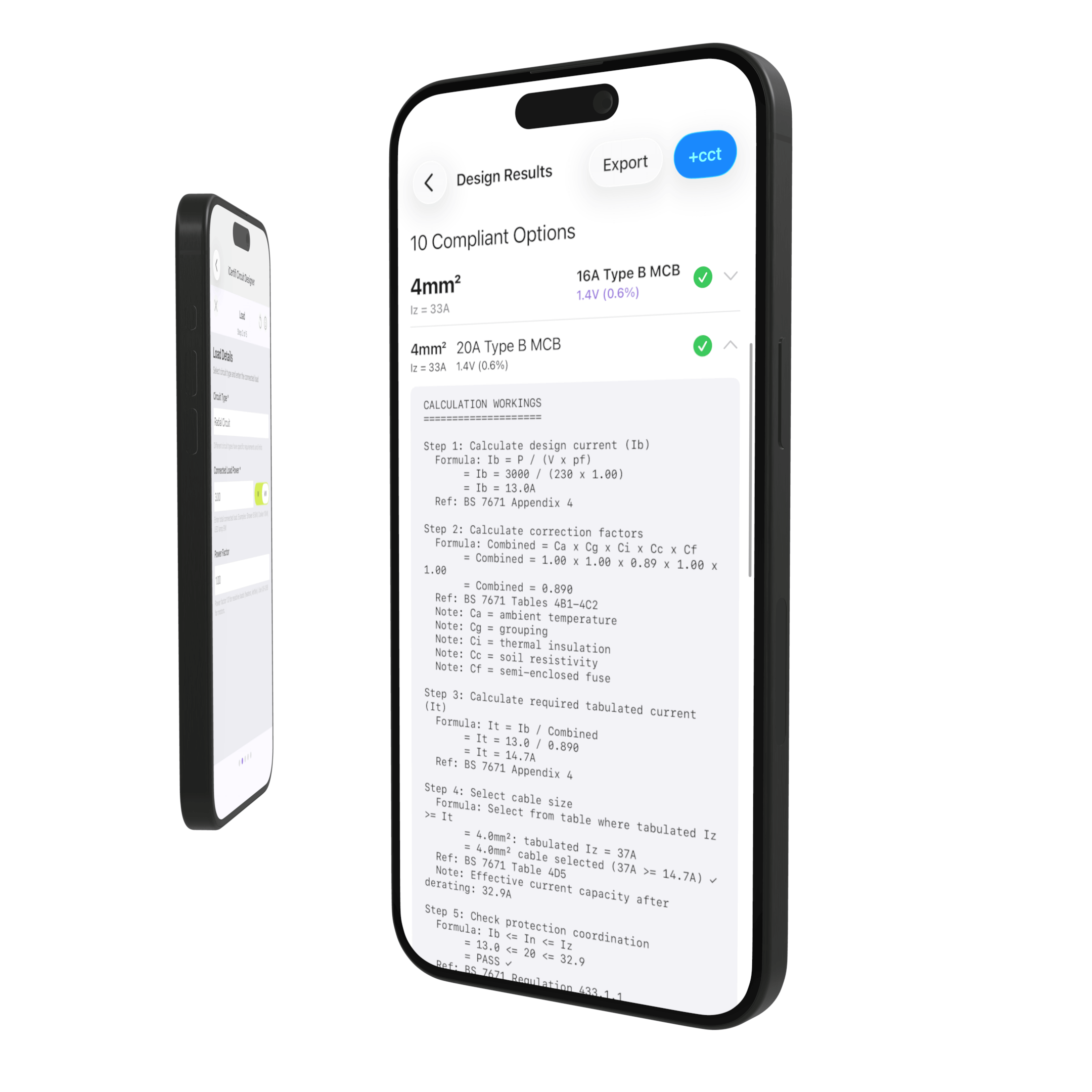
Every electrician knows the drill. You need to verify a cable size for a certificate, so you pull out your copy of BS 7671, turn to Appendix 4, cross-reference current-carrying capacity tables, apply derating factors, check voltage drop, calculate Zs, and verify disconnection times. One circuit can eat up twenty minutes of careful arithmetic — and a single slip means a non-compliant design.
iCertifi’s Circuit Designer does all of that in under two minutes. It is a fully integrated BS 7671:2018+A2 cable sizing calculator built directly into the iCertifi iOS app, designed specifically for UK electricians, electrical contractors, and domestic installers who need reliable, regulation-compliant circuit design on site or in the office.
No more manual lookups. Circuit Designer pulls from the same BS 7671 cable data tables you would reference by hand — Tables 4D1A, 4D5, 4D4A, 4E4A, and 4J1/4J3 — and applies every correction factor automatically.
Five Steps From Blank Screen to Compliant Circuit
Circuit Designer uses a guided 5-step wizard interface that walks you through every design parameter. No guesswork, no missed variables, no hunting for the right table. Just answer each step and the app handles the maths.
Step 1: Supply
What you enter:
- Supply voltage — 230V single phase or 400V three phase
- Earthing system — TN-C-S, TN-S, or TT
- Ze value (external earth fault loop impedance)
- PSCC (prospective short-circuit current)
The earthing system selection is critical because it determines how automatic disconnection of supply (ADS) is verified. TT systems, for example, rely on RCD-based protection rather than Zs values alone — and Circuit Designer handles this distinction automatically.
Step 2: Load
What you enter:
- Circuit type — radial, ring final, shower, cooker, immersion heater, EV charger, lighting, three-phase balanced, or electric heating
- Power requirements in watts or kilowatts
The app automatically calculates design current (Ib) from your power input. Select from pre-configured templates for common circuits — ring finals, radial sockets, lighting, showers, cookers, and EV chargers — so standard installations take seconds to set up.
Ring final circuits are handled intelligently: the app automatically doubles the current-carrying capacity and applies the /4 voltage drop calculation method required by the regulations.
Step 3: Cable
What you enter:
- Cable type — Twin & Earth, SWA PVC, SWA XLPE, Singles in Conduit, or MICC (Mineral Insulated)
- Cable run length in metres
Circuit Designer references the correct BS 7671 cable data table for your selected cable type. Whether you are using Table 4D5 for flat Twin & Earth, Table 4D4A for SWA PVC, Table 4E4A for SWA XLPE, Table 4D1A for singles in conduit, or Tables 4J1/4J3 for MICC cables — the right current-carrying capacities and resistance values are applied automatically.
Step 4: Installation
What you enter:
- Reference method — C, D, E, F, or 100-103
- Ambient temperature
- Grouping factors
- Thermal insulation contact
This is where most manual calculation errors occur. Getting derating factors wrong — or forgetting to apply one entirely — leads to undersized cables and failed inspections. Circuit Designer calculates and applies every factor for you:
- Ca — ambient temperature correction factor
- Cg — grouping correction factor
- Ci — thermal insulation correction factor
- Cc — BS 3036 semi-enclosed fuse factor (where applicable)
Step 5: Protection
What you enter:
- Protective device type — MCB Type B, C, or D, RCBO, BS 88 Fuse, or BS 3036 Fuse
- Disconnection time
- AFDD and SPD options
The final step brings everything together. Circuit Designer verifies that your chosen protective device will disconnect within the required time by calculating Zs (Ze + R1+R2) and checking it against the maximum Zs values from BS 7671. You get a clear pass or fail for ADS compliance — no ambiguity.
Every Calculation, Done Automatically
Once you complete the five steps, Circuit Designer produces a full set of BS 7671:2018+A2 compliant results. Here is what it calculates for every circuit:
Cable Sizing
- Minimum cable size based on current-carrying capacity (Iz) with all derating factors applied
- CPC sizing verification
Voltage Drop
- Calculated voltage drop with pass/fail indication
- 5% limit applied for power circuits, 3% for lighting circuits
Earth Fault Loop Impedance
- R1+R2 calculated from cable resistance tables
- Zs = Ze + R1+R2
- Maximum Zs verification against BS 7671 tables
Protection
- Automatic disconnection of supply (ADS) compliance check
- TT system handling with RCD-based verification
- Warnings and recommendations based on results
Pro Tip: Circuit Designer also calculates PSCC automatically from Ze when you do not have a measured value — one less thing to worry about on a domestic job.
Five Cable Types. All the Tables.
Circuit Designer includes current-carrying capacity and resistance data from the BS 7671 cable tables that electricians use daily:
| Cable Type | BS 7671 Table |
|---|---|
| Singles in Conduit/Trunking | Table 4D1A |
| Twin & Earth Flat Cable | Table 4D5 |
| SWA PVC Insulated | Table 4D4A |
| SWA XLPE Insulated | Table 4E4A |
| MICC (Mineral Insulated) | Tables 4J1 / 4J3 |
You no longer need to flip between Appendix 4 tables to find the right current rating or mV/A/m value. Circuit Designer selects the correct table, finds the right column for your reference method, and returns the result.
Designed Circuits Flow Straight Onto Your Certificates
This is where Circuit Designer goes beyond a standalone calculator. Every circuit you design can be saved directly to a distribution board schedule in iCertifi. The app automatically populates the fields that matter for certification:
- Cable size and CPC size
- Protective device type and rating
- Maximum Zs value
- Reference method
Those completed schedules then flow directly onto your EIC, EICR, and Minor Works certificates. No retyping. No transcription errors. Design the circuit, verify it complies, and the certificate data is already filled in.
Time saved: Electricians using Circuit Designer report completing cable sizing verification and certificate population in a fraction of the time compared to manual methods. Design the circuit once, and the data carries through to every document that needs it.
Professional Output You Can Stand Behind
Circuit Designer does not just give you a cable size and leave you guessing. Every calculation produces detailed output that shows the full methodology:
- Full calculation breakdown — see exactly how every result was derived
- Design notes — the app explains the methodology and any assumptions made
- Pass/fail indicators — clear visual confirmation for each compliance check
- Warnings and recommendations — flagged issues with guidance on how to resolve them
- PDF export — export calculation sheets as professional PDFs for your records or to submit alongside certificates
- Full audit trail — every design parameter is recorded for future reference
If a Qualifying Supervisor or building control officer asks how you arrived at a cable size, you have the documentation to back it up — produced instantly, on site, from the same app you used to create the certificate.
Built for How Electricians Actually Work
Circuit Designer was built from conversations with working electricians who told us what they needed: something fast, accurate, and directly tied to their certification workflow. It is not a generic engineering calculator adapted for UK regs — it was designed from day one around BS 7671:2018+A2.
Smart features that save time:
- Pre-configured templates for common circuits eliminate repetitive data entry
- Automatic PSCC calculation from Ze when no measured value is available
- Intelligent TT system handling — switches to RCD-based ADS verification automatically
- Clear warnings when results are marginal or when a design decision needs attention
Pro Tip: Use Circuit Designer before you buy materials. Verify your cable sizing on the app, confirm the circuit complies, and you will know exactly what to order — avoiding costly return trips to the wholesaler.
Frequently Asked Questions
Is Circuit Designer compliant with the latest 18th Edition?
Yes. Circuit Designer is fully compliant with BS 7671:2018+A2, including the latest amendment. All cable data tables, maximum Zs values, and disconnection time requirements reflect the current edition of the regulations.
Can I use it for three-phase circuits?
Yes. Circuit Designer supports three-phase balanced circuits alongside all standard single-phase circuit types.
Does it replace the On-Site Guide?
Circuit Designer is a design verification tool that uses the same data and methodology as the On-Site Guide and BS 7671 Appendix 4. It automates the calculations you would otherwise perform manually, but we always recommend keeping your reference copies available.
How do the results feed into my certificates?
Designed circuits can be saved directly to distribution board schedules within iCertifi. The cable size, CPC size, device type, rating, maximum Zs, and reference method are automatically populated. Those schedules then form part of your EIC, EICR, or Minor Works certificate.
What cable types are supported?
Twin & Earth (Table 4D5), SWA PVC (Table 4D4A), SWA XLPE (Table 4E4A), Singles in Conduit (Table 4D1A), and MICC Mineral Insulated cables (Tables 4J1/4J3).
Can I export the calculation results?
Yes. Every circuit design can be exported as a PDF calculation sheet showing all input parameters, applied derating factors, and results. This gives you a full audit trail for your records or for submission alongside certificates.
Design Compliant Circuits in Minutes
BS 7671:2018+A2 cable sizing calculator. Voltage drop. Zs verification. ADS compliance.
All built into the electrical certificate app UK electricians trust.
Tags: BS 7671 cable sizing calculator, circuit design app for electricians, cable sizing iOS app, 18th Edition calculator, Zs calculator, voltage drop calculator, electrical certificate app UK, EV charger circuit design, cable sizing tool, BS 7671 compliance, electrical installation calculator