Capture Electrical Test Results Instantly with AI
Test Vision is a powerful new feature in iCertifi that turns your test instrument display into structured certificate data — instantly.
Instead of manually typing readings into your certificate, simply photograph the screen of your test instrument. Test Vision automatically reads the values and imports them directly into your electrical certificate.
No cables. No Bluetooth pairing. No manual entry
Turn Test Readings Into Certificate Data
When testing electrical circuits, every reading matters — loop impedance, insulation resistance, RCD trip times, and more. Traditionally, this means switching between your tester and your phone or tablet, manually typing each value into the certificate.
Test Vision removes that step entirely.
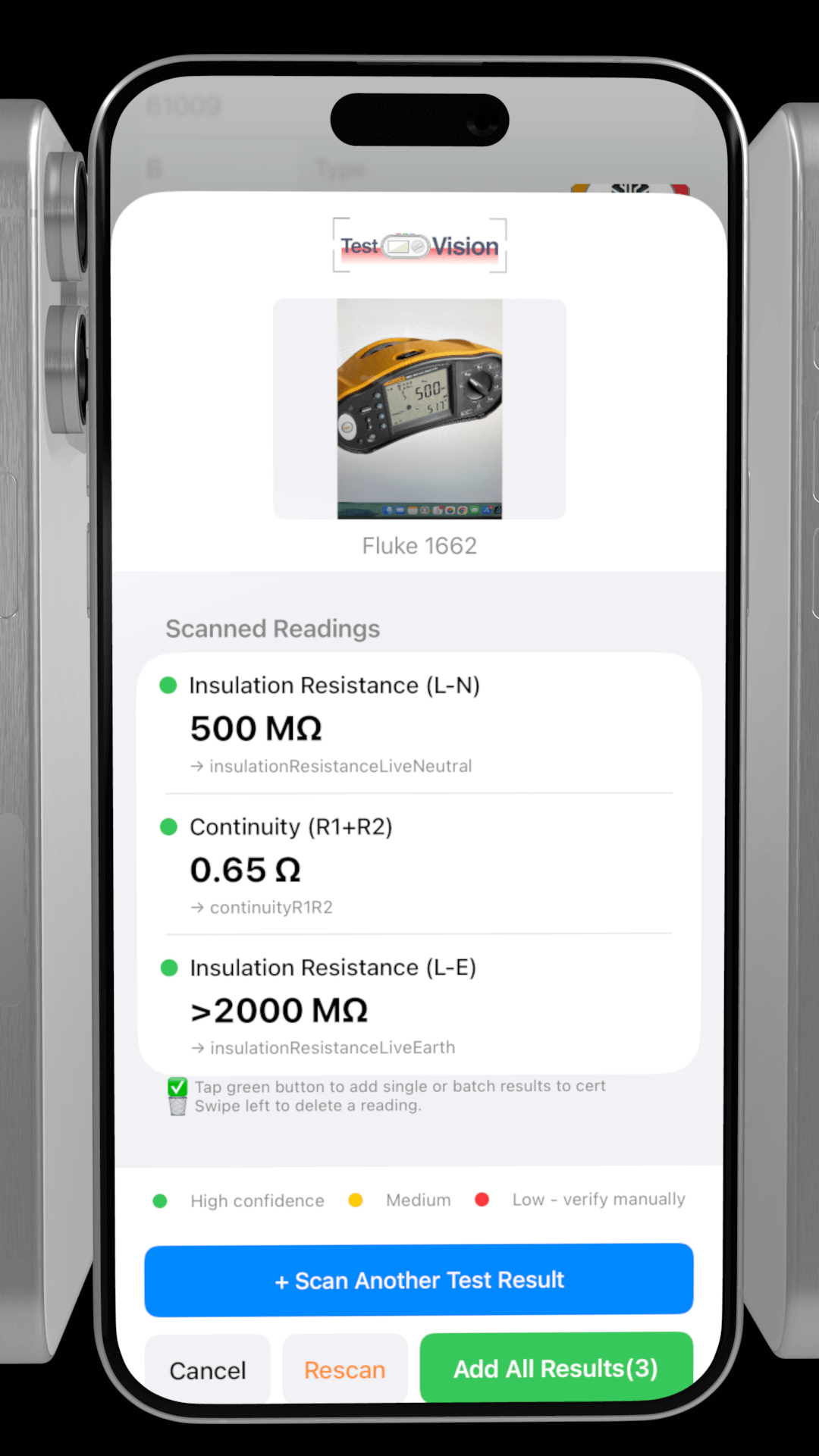
Just take a photo of the test instrument display. Test Vision extracts the measurement, identifies the test type, and inserts the correct value into the correct field of your certificate. Available on V12.12.30
Intelligent Test Detection
Test Vision Scanner doesn’t require you to specify what test you’re recording. It figures that out from visual cues.
Is the dial set to loop impedance and the display showing ohms? That’s a Zs reading. Is the instrument in megohm mode with the L-E indicator lit? Insulation resistance live to earth. Is the screen showing milliseconds with an RCD test selected? Trip time at rated current.
The AI examines dial position, screen indicators, display units, and instrument-specific layouts to classify the test type correctly.
Broad Instrument Compatibility
UK electricians use various test equipment manufacturers, and the MFT Scanner supports them all.
Megger instruments including the MFT1711, 1721, 1731, and 1741 series, plus the colour-screen MFT-X1. Fluke testers from the 1652 through to the 1664. Kewtech models including the KT65DL, KT66DL, and KT66EV. Metrel MI 3152 and MI 3155 units.
Whether you’re using a traditional LCD segment display or a modern colour graphical screen, the MFT Scanner adapts to your equipment.
Multiple Readings, One Photo
Many multifunction testers display more than one value on screen. A loop impedance test might show both Zs and the calculated maximum permitted value. An RCD test might display trip time alongside test current.
The MFT Scanner captures all displayed readings and lets you review them before importing. You see exactly what the AI extracted and can select which values to populate.
Batch Scanning Mode
For efficient testing workflows, the MFT Scanner supports batch operation. Take photos of multiple test results in sequence. Each scan adds to a queue visible in a table view.
When you’ve captured all your readings, review the list. Tap individual items to populate specific circuit fields, or use the Add All function to import everything at once.
This approach matches how electricians actually test. Complete all the measurements on a circuit, photograph each result, then import the batch. No context switching between testing and data entry.
Confirmation Before Import
Every scanned reading shows a confirmation screen before populating your certificate. You see the detected test type, the extracted values, and which circuit fields will be updated.
Low confidence readings are highlighted for verification. If the display was partially obscured or the AI isn’t certain about a value, you’ll know to check before confirming.
Pass and Fail Indication
The MFT Scanner doesn’t just record values. It applies BS 7671 limits to indicate whether readings pass or fail.
Insulation resistance below 1.0 megohms? Flagged as a fail. RCD trip time exceeding 300 milliseconds at rated current? Marked as non-compliant. Loop impedance above the maximum permitted for the protective device? Highlighted for attention.
This immediate feedback helps you identify problems during testing rather than discovering them during certificate review.
Practical Tips
For best results, photograph the display with good lighting and avoid glare from overhead sources. Capture straight on rather than at an angle. Include the full display area and, where possible, the selector dial position.
If the AI struggles with a particular reading, retaking the photo with better lighting or framing usually resolves it. The two-pass analysis approach means most images produce accurate results on the first attempt.
Available In iCertifi V12.12.26
Test Vision is included in iCertifi and uses the same AI token system as Board Vision and other AI features. Each scan consumes one token, making the cost predictable and the feature accessible.
Start photographing your test results instead of typing them. Your fingers will thank you.
Only with iCertifi
Frequently Asked Questions
What is Test Vision?
Test Vision is an AI-powered feature in iCertifi that reads electrical test instrument displays and automatically imports the results into your electrical certificate.
Which test instruments are supported?
Test Vision supports a wide range of popular electrical test instruments, including models from Megger, Fluke, Kewtech, and Metrel.
Does Test Vision require a cable or Bluetooth connection?
No. Test Vision works using the device camera and does not require any physical connection to the test instrument.
Can I review readings before they are saved?
Yes. All detected values are shown for confirmation before being added to the certificate, ensuring accuracy and control.
The full range of BS 7671 electrical certificates. EIC, EICR and Minor Works, with the calculators built in – Zs verification, R1+R2, PFC and cable sizing.