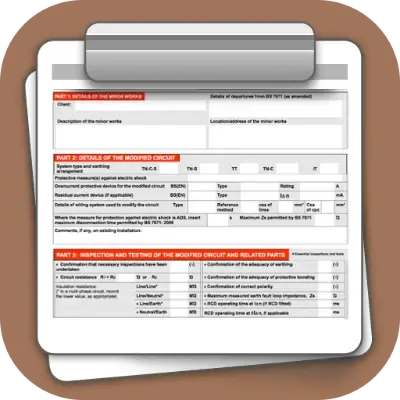
BS 7671:2018+A4:2026 electrical certificates
Electrical Certificate App for BS 7671 Compliance
iCertifi is a professional BS 7671 electrical certificates app for UK electricians. Finish the EICR, EIC or Minor Works on site and send the PDF before you leave the job.
- Scan the board. Board Vision reads the circuits off a photo of the consumer unit and fills in the schedule.
- Photograph the tester. Test Vision reads the results off your meter’s screen. Works with any test instrument.
- Send it before you leave. Email the finished PDF to your client or AirPrint it, straight from the job.
- No signal? No problem. Works fully offline in lofts, basements and new builds.

★★★★★4.6 out of 5 from 6,900+ App Store ratings. Free to try on iPhone, iPad, Mac and Android. See how a job goes ›

-
BS 7671 Electrical Installation CertificateA new circuit, a consumer unit change, or an alteration in a special location.
-
Domestic Electrical Installation CertificateThe same work in a domestic installation, with fire detection and ventilation sections.
-
Minor Works CertificateAdditions and alterations that do not extend to a new circuit.
-
3 Circuit Minor Works CertificateMinor works across up to three circuits on one certificate.
-
Electrical Installation Condition ReportCode every observation C1, C2, C3 or FI and attach the photos from the job.
-
Landlords Interim CheckAn interim check between EICRs, at a change of tenant or at least every 12 months.
-
Visual InspectionReports on the condition of an existing installation by inspection.
-
Electrical Danger NoticeFor reporting a dangerous condition in an existing fixed installation.
-
Electrical Risk AssessmentProtect yourself, your business and others, and comply with the law.
-
Electrical Isolation CertificateAfter part or all of an installation has been safely isolated.
-
Earthing & Bonding CertificateFor the installation, upgrade or repair of main and supplementary bonding.
-
EV Charger Point CertificateA full installation certificate for an electric vehicle charge point.
-
EV Risk AssessmentChecklist and risk assessment for installing EV charging equipment.
-
Solar PV CertificateAn eight part solar PV array test report to BS EN 62446-1.
-
Ventilation CertificateA standalone test certificate for ventilation equipment.
It is not only an electrical certificates app. It helps you run the business.
Certificates are the job. Clients, retests, reminders and invoices are the business. iCertifi keeps all of it in one place, and hands the rest to the apps you already use.

Client Hub
Every client, their certificates, their retest dates and your notes on one card. The list builds itself as you send certificates out.

Retest reminders
Every next inspection date is watched. iCertifi shows who is overdue and who is due soon, and writes the reminder for you to read and send.

Invoicing
Finish the certificate and the draft invoice is waiting in Mint Books, priced from your own price list. Nobody types the job out twice.


Talks to your other apps
Mint Books, Verifi, your Calendar, your Contacts, Dropbox and the other iCertifi apps on your device.
Your competition is still typing. You’re already done.
From the consumer unit to the next booking, every step of the job happens in one app. Tap a step to see how it works.


Bring them back
Client Hub and Retests due tell you who to remind before their certificate runs out.

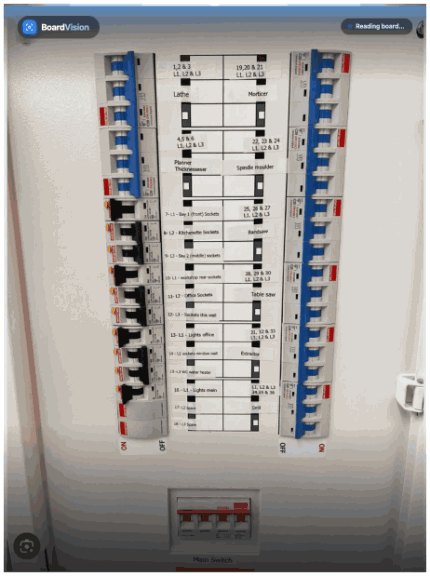
However the circuit data exists, Board Vision finds it
Photograph a distribution board, a printed or handwritten schedule, or scan a PDF certificate. Board Vision reads it, builds the circuit schedule and shows you everything before anything goes onto your certificate.
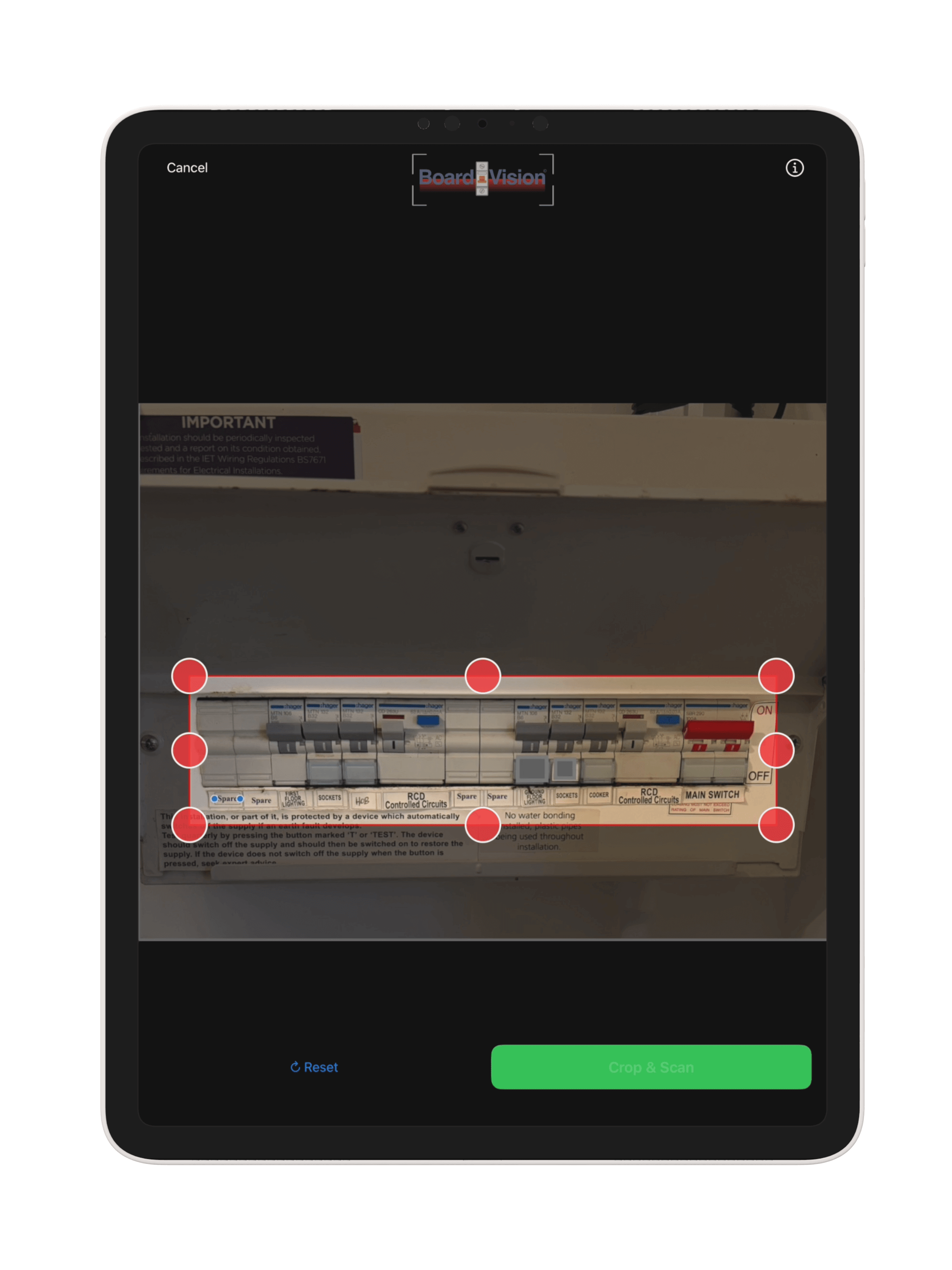
Three ways to scan
Scan Whole DB Board
One photo of the board: every way, device and rating, including 3-phase TP&N boards.
Single Circuit
Add or check one circuit at a time without rescanning the board.
Hand Written Or Printed Schedule
Bring in the schedule from an old paper or PDF certificate. Scan Another Sheet when it runs over more than one page.
- Reads MCBs, RCBOs, AFDDs, RCDs, SPDs, fuses and main switches, with their ratings
- 3-phase TP&N boards with L1, L2 and L3 worked out automatically
- Scan a PDF certificate and its circuit data comes straight in
- Warns you if the photo is blurry, too dark or has glare, or does not show a board, so you can retake it
Photograph
Frame the board or the schedule, crop to what matters and tap Crop & Scan.
Review
Every circuit, device, rating and phase on the full screen Review Scan. Change anything before you import.
Import
The circuit schedule fills in on your certificate, with L1, L2 and L3 printed where they apply.
Watch Board Vision scan a real board
See a consumer unit go from one photo to a filled circuit schedule in iCertifi.
Test Vision: point the camera at the tester and the reading lands in the right box
Photograph your multifunction tester’s display. Test Vision recognises the test you are doing, reads the value and fills your certificate. Works with any test instrument: no cables, no pairing, no manufacturer software.
- Camera buttons on Continuity, Insulation resistance, Zs and RCD results
- Scan one result after another, then Add All Results to the circuit in one tap
- A confirmation screen shows every value, how confident the reading is (high, medium or low) and the box it will fill, before anything is added

Circuit details and test results: tap Ring and the circuit fills itself
The circuit page shows circuit details and test results together, or one half at a time. What you need is on the page, not hidden in a menu.
- Quick Fill bar: Ring, Radial, Lights, Cooker, Shower, Immersion, Smoke, Boiler, Spare, EV charger, Garage, your own saved circuit, and More with over 50 domestic, commercial, industrial and sub-main options
- A camera button on each test result scans your tester straight into the right box
- Test Logic speaks on the page: an out of range reading turns red or amber with a short explanation and what to do next
- On a TT installation, a reminder that every circuit needs an RCD (Regulation 411.5.2) when no RCD is entered
- The Circuit Assistant menu: Copy Circuit, Paste Circuit, Save Circuit As Template, and Mark circuit as complete
Digital schedule of test results: turn your device sideways and the board becomes a spreadsheet
No more paper EICR test sheets. One row per circuit and every column the schedule prints, with the same pick lists as the circuit page. Return moves down the column and skips spare ways.
- No. and designation stay put while you scroll sideways
- L1, L2 and L3 rows are tinted, and out of range readings are coloured by the same rules as the circuit page
- N/A, Lim and Clear sit on the keyboard bar
- Turn back and the circuit page shows what you typed. Detailed View on the board page opens the same grid
- Add a circuit, a 3 phase circuit or group, several at once, a spare, a submain, a template, Pre Filled Circuits, Board Vision or Design Circuit from one menu
Automatic DB schematic: see what feeds what
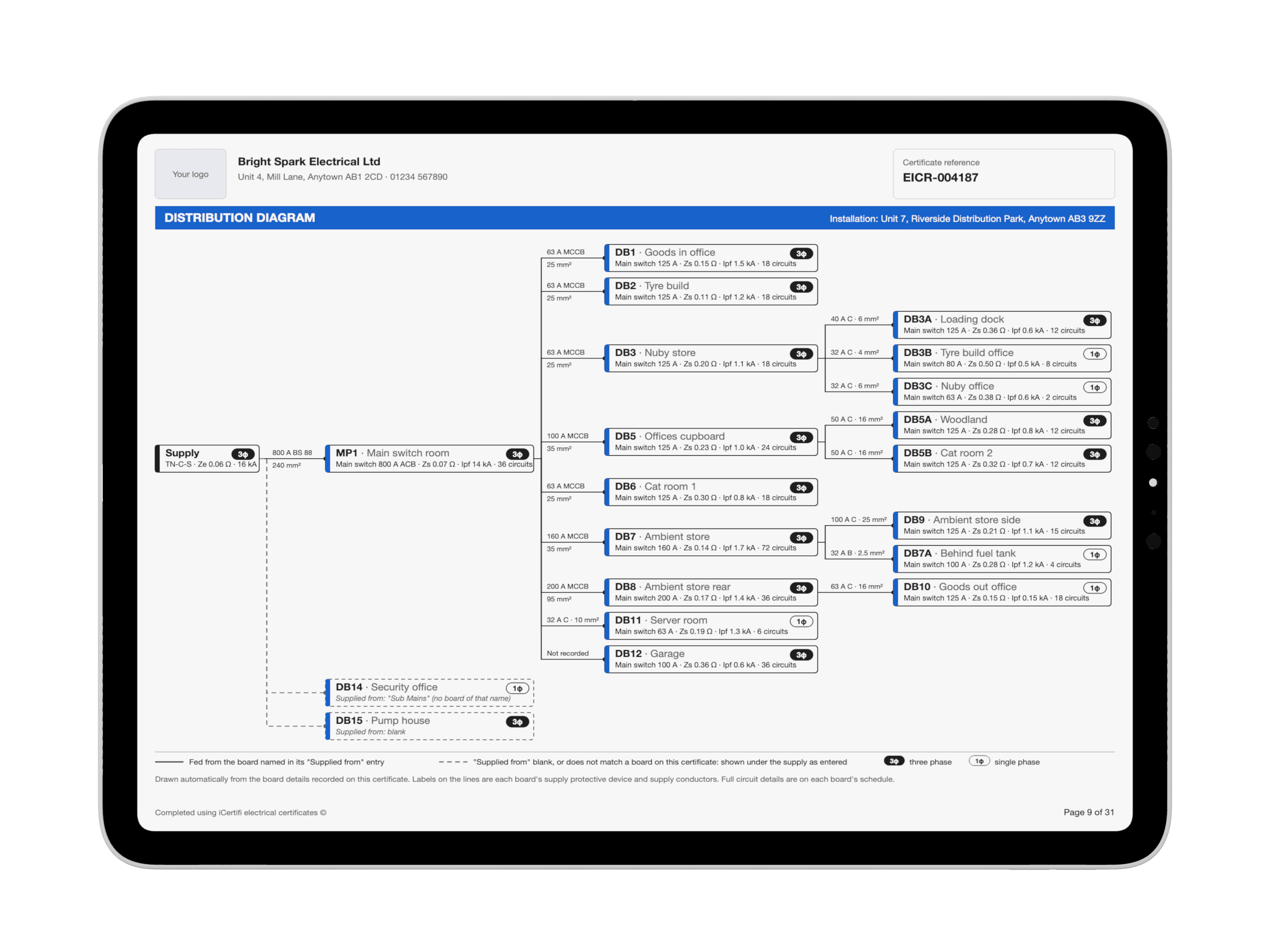
On any certificate with two or more boards, iCertifi draws the distribution diagram for you: the supply, every board and the board that feeds it, on its own PDF page.
- Drawn from each board’s Supplied from box, so there is nothing new to fill in
- Supply device and cable size on every line, with main switch, Zs, Ipf and circuit count on every board
- Blank or unmatched links show as dashed lines, never guessed
- Check board links spots boards fed from a circuit called DB10 Supply and asks before filling it in
- EICR, EIC, Domestic EIC and EV Charger. Turn on Board Diagram in Settings, or per certificate from the cog menu
Certificates from another app? Import the PDF
Moving to iCertifi, or taking over a job another firm certified? Import PDF reads a certificate made in another app or software and turns it into an iCertifi certificate for you to check and finish.
- Tap the cog in Saved Certificates, then Import PDF. Save the PDF to Files first, then choose it
- Copies the client and installation details, the supply details, and every board, circuit and test reading on the schedule
- Make it an EICR, EIC, Domestic EIC or Minor Works
- Any reading the PDF gave two different answers for is shown for you to pick or type before anything is imported
- Tick boxes, observations, the earthing type and the overall result are not copied, so you fill those in yourself
- Your first 10 imports are free, whatever their size. After that each circuit uses 1 AI token, the same as BoardVision

From EICR observation to the repair certificate
Coded a C1, C2, C3 or FI on an EICR? Tap Certificate for this repair on the observation and choose the certificate the work needs. The new certificate starts filled in from the EICR.
- Minor Works for a repair or change to one circuit. Pick the circuit and its details come across
- EIC or Domestic EIC for a new consumer unit, new circuits or a rewire. For a consumer unit change, copy the boards and circuits (names, cables and wiring) or start with an empty board
- The client, address, contractor, supply and earthing details come from the EICR, with a description of the work taken from the observation
- Test results, protective devices, dates and signatures are left blank for the work you have not done yet
- The EICR is not changed. The new certificate is waiting in Saved Certificates

An EICR app with photo evidence: a picture tells a thousand words
iCertifi is EICR software on your iPhone and iPad. Code every observation C1, C2, C3 or FI and attach the photos straight from the job. Your customer sees the evidence in the report, and you keep a complete, defendable record.
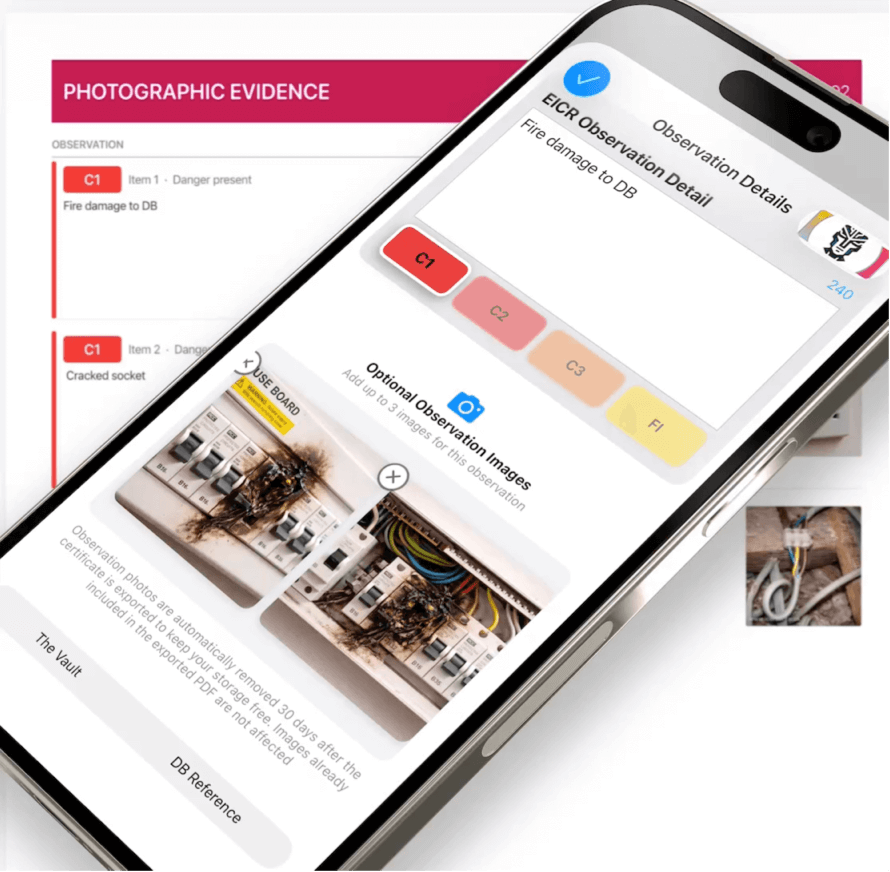
Up to three photos per observation
Long press to add a caption, double tap to view full screen, swipe through and pinch to zoom. The photos print on a Photographic Evidence page in the PDF.
Observation only (OBS)
Record things worth noting that do not carry a code. They print as Observation only, clearly apart from the coded items.
EICR Smart Covers
Printable completion certificates for your customer to display, with your business and their details added automatically. A one off purchase unlocks the premium designs.
Remedial works certificate
Once the work is done, turn on Remedial works completed: your C1 and C2 observations are set to satisfactory and the EICR becomes a completion certificate. The original EICR is not affected.
Convert an EICR
Make a Minor Works, EIC or Domestic EIC from the EICR you already wrote. A converted copy is made and the original is unchanged.
Amendment 4 EICR
The new inspection schedules and observations layout, extent and location of sampling, and the PNB earthing option.

No More Calls To The Technical Helpline
Most AI chat knows nothing about your job. Spark AI is opened from inside the certificate and is fully context aware.
Check the whole certificate in one tap
Supply, earthing, bonding, boards, circuits, RCD and AFDD data, observations and signatures, all checked against BS 7671 before the certificate goes out.
Tap the cog in the PDF preview. AI Circuit Check does a single circuit from the circuit page’s Assistant menu.
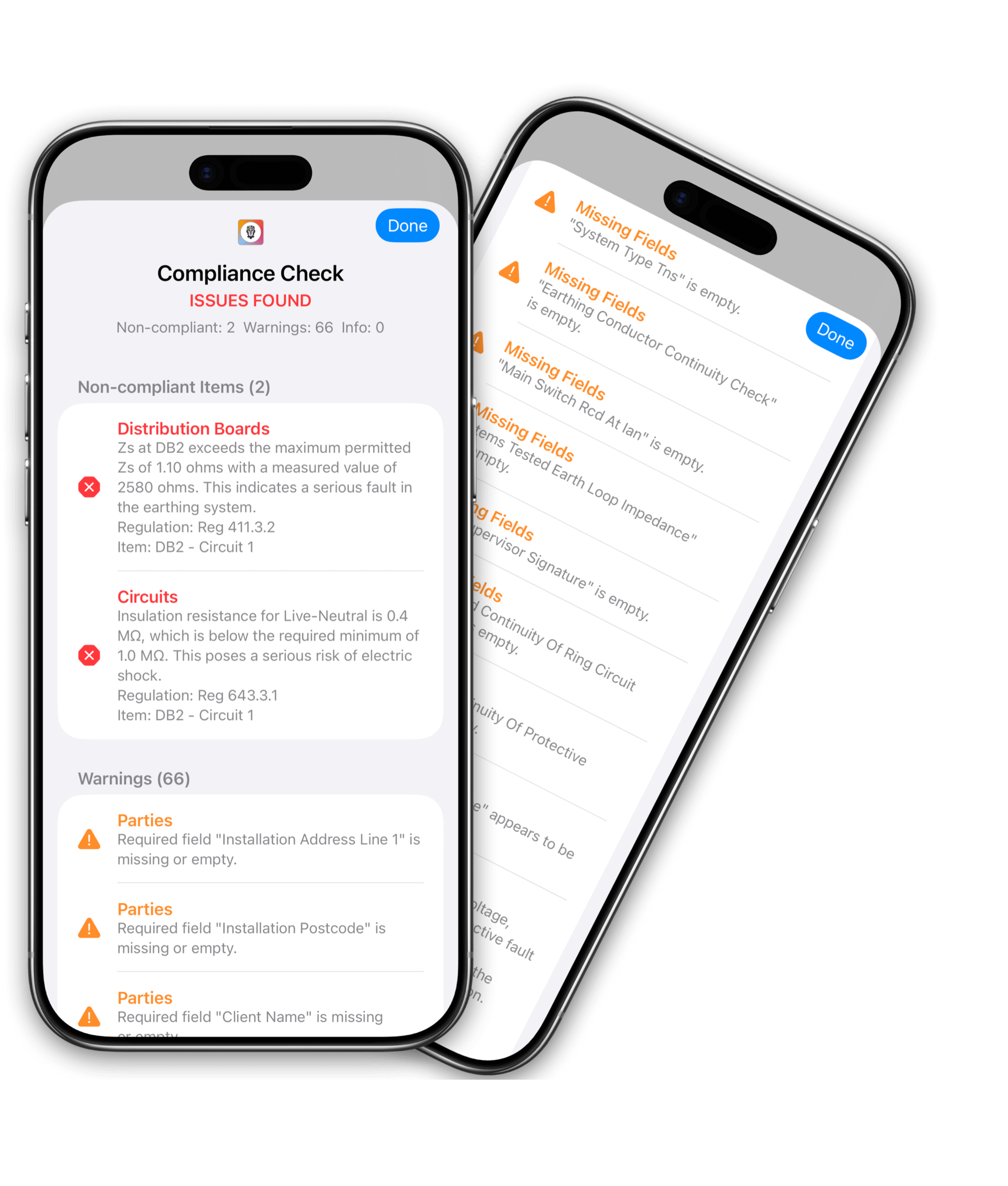
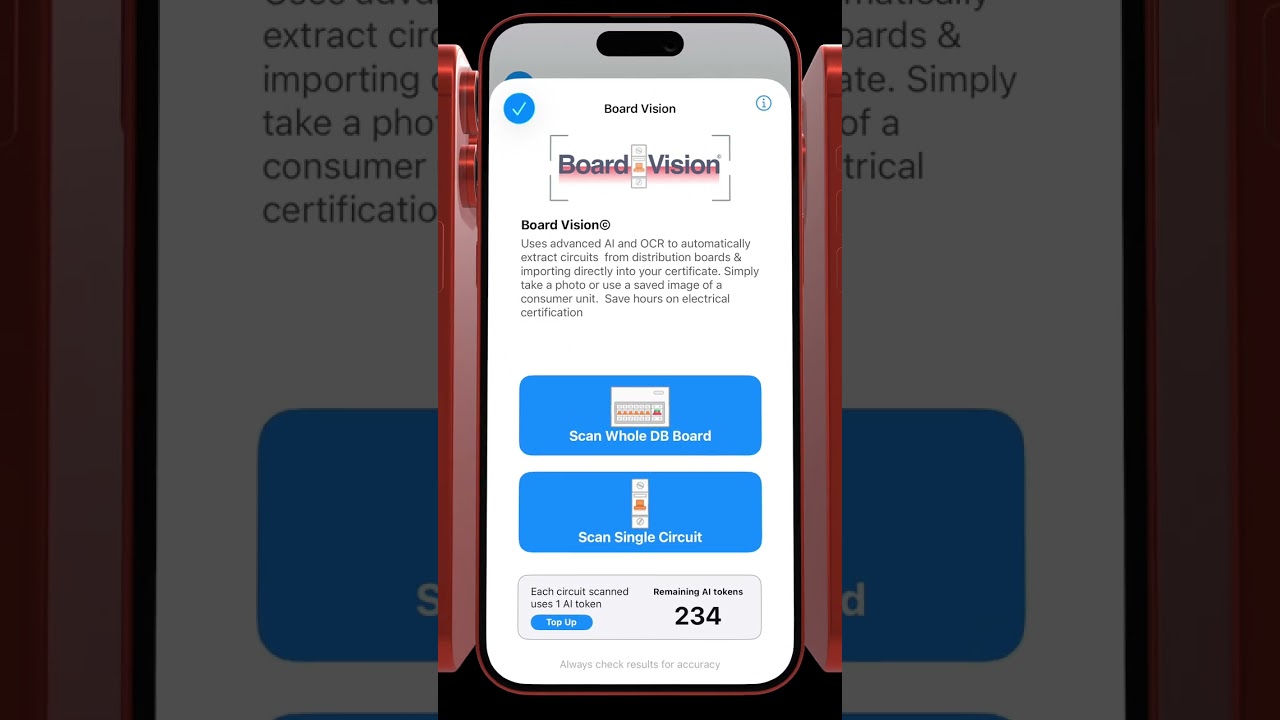
Watch AI at work
See Board Vision and the AI built into iCertifi in one short video.
Client Hub: every client and certificate in one place
Your customer list builds itself while you work. Every client, their certificates, their retest dates and your notes, together on one card.
- Fill the address with one tap from your GPS position, or pull the client in from your Contacts
- See what is overdue and due soon for every client, and remind them before their certificate runs out
- Your clients stay safe if your subscription ends: they turn read only until you subscribe again
Clients save themselves
Send a certificate and the client on it is saved automatically, with their address, phone and email.
Every certificate on their card
Certificate History lists everything you have issued for that client, newest first. Tap one to open it.
Start the next job from the client
Tap New Certificate on the client’s card and their details are ready to go.
Retest dates appear on their own
The next inspection date from each certificate shows on the client, with Add all to Calendar.
Reminders before work is due
A notification at 9am before each retest is due, so the repeat work comes back to you.
Private notes that travel
Keys, access, parking. Notes are private to you and sync with the client across your devices.
Shared across your iCertifi apps
One client list for your iCertifi apps, synced with iCloud across iPhone, iPad and Mac.
No duplicate clients
Client Hub spots and merges duplicate clients automatically, and stops new ones being created.
Find anyone fast
Search by name, address, postcode or email, with Needs your attention at the top.
Retests due: your old certificates bring in the next job
Every EICR, EIC, Domestic EIC and EV Charger certificate with a next inspection date is watched. iCertifi shows who is overdue and who is due soon, grouped by client, and writes the reminder for you.
- Look ahead 30, 60 or 90 days, and see what is overdue on the Home screen and on a Home Screen or Lock Screen widget
- Tap Remind to open a ready written email, or a text when you only have a phone number. You read it first, and nothing is sent by itself
Saved Certificates: find any EICR, EIC or Minor Works in seconds
Every row shows the client, the address, the certificate type, whether it is a draft, issued or sent, and when the retest is due.
Search that finds it
Search by title, client, address, postcode, reference or board name.
Filter and sort
All, Drafts, Issued, Overdue retest and Pinned. Sort by Last edited, Created, Retest due, Client, Reference or Type. Your choice is remembered.
Swipe and hold
Swipe left for PDF, Duplicate, Convert or Delete. Swipe right to Pin, Mark sent or open the Client. Touch and hold to preview a certificate without opening it.
Many at once
Select up to 20 certificates to export them as one ZIP file, or mark them all as sent.
Qualifying Supervisor sign off without your QS coming to site
Send a finished certificate to your Qualifying Supervisor from the PDF preview. They get a notification, review it on their iPhone or iPad, and approve it with their signature or reject it with a reason. Every approval and rejection goes into the QS Signature Record.
QS remote signing needs an Enterprise subscription.

Circuit Designer cable sizing. Two minutes. Every calc. Zero guesswork.
Five steps, Supply, Load, Cable, Installation and Protection, size the cable and check it against BS 7671, with the working shown for you and for your assessor.
- Current carrying capacity with Ca, Cg, Ci and Cc applied
- Voltage drop (3% lighting, 5% other), R1+R2, Zs and the adiabatic check on the cpc (Regulation 543.1.3)
- Ring finals, TT systems using 50 V ÷ IΔn, and 23 circuit types including EV chargers, solar PV, battery storage, heat pumps and three-phase
- Export the Circuit Calculation Sheet as a PDF
- Accept a design that does not comply if you can justify it: your written justification is recorded
Professional PDF electrical certificates that look like they came from your business
A proper A4 PDF with your branding, signed on site and emailed to your client before you leave the car park.
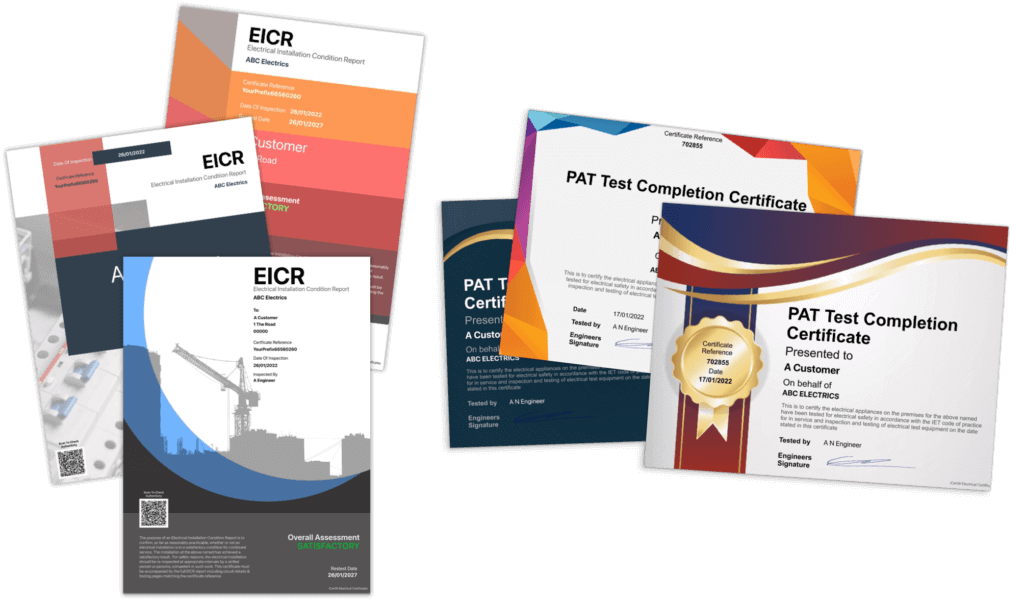
Your logo, scheme logo and colours
Every EICR, EIC and Minor Works certificate looks like it came from your business.
Signed on site
Capture signatures on your iPhone or iPad at the job, so the certificate is finished before you leave.
Send it from the job
Email the PDF to your client straight from the app. No office, no printer.
Kept exactly as issued
The first exported PDF is kept as the issued version. Tap Revise to update it with a reason, or issue a new certificate instead.
Templates and duplicates
Pre-filled board layouts, reusable circuit templates, or start from a previous certificate.
Every page numbered
Page numbers on every printed page, so nothing goes missing.
15 BS 7671 electrical certificates, grouped the way you work
Electrical certificate software for EICR, EIC and Minor Works certificates and more. Every one is a BS 7671 certificate built for BS 7671:2018+A4:2026. Search by name, or by the job: try “landlord”, “solar” or “isolation”.
BS 7671 Electrical Installation Certificate
For a new circuit, low voltage (typically 230 V) or extra low voltage, the replacement of a consumer unit, or any alteration or addition to an existing circuit in a special location. iCertifi is the fastest electrical installation certificate app for completing and issuing EICs on site.
Domestic Electrical Installation Certificate
The same work in a domestic installation, with fire detection and ventilation sections you can turn on in Settings. The leading domestic electrical certificate app for completing domestic EICs directly from the job.
Minor Works Certificate
Additions and alterations that do not extend to a new circuit, such as adding socket outlets or lighting points, or moving a light switch. The most popular minor works certificate app used by UK electricians.
3 Circuit Minor Works Certificate
Minor works across up to three circuits on one certificate.
Electrical Installation Condition Report
Confirms, so far as reasonably practicable, whether the installation is in a satisfactory condition for continued service, and identifies damage, deterioration, defects and conditions that may give rise to danger. A complete mobile electrical inspection app for recording observations, test results and outcomes on site.
Landlords Interim Check
Landlords must keep rental properties safe. An interim check between EICRs, at a change of tenant or at least every 12 months. The go to landlord electrical certificate app for agents and property managers.
Visual Inspection
Reports on the condition of an existing installation by inspection, identifying damage, deterioration or defects that may give rise to danger.
Electrical Danger Notice
For reporting a dangerous condition in an existing fixed electrical installation.
Electrical Risk Assessment
An important step in protecting yourself, your business and others, and in complying with the law.
Electrical Isolation Certificate
For use after part or all of an installation has been isolated using a safe isolation procedure.
Earthing & Bonding Certificate
For the installation, upgrade or repair of main and supplementary bonding.
EV Charger Point Certificate
A full installation certificate for an electric vehicle charge point.
EV Risk Assessment
Checklist and risk assessment for installing electric vehicle charging equipment.
Solar PV Certificate
An eight part solar PV array test report to BS EN 62446-1, to verify the system and comply with safety requirements.
Ventilation Certificate
A standalone test certificate for ventilation equipment. Also included in the Domestic EIC.
No certificates match your search.
Remedial works: once the C1 and C2 work is done, any EICR can produce a remedial completion certificate.
Certificate done. Invoice done.
Link iCertifi to Mint Books and stop typing the same job out twice. Complete a certificate and create its PDF, and Mint Books builds the draft invoice. You do the electrics, the paperwork does itself.
- No double entry, ever
- Matched by reference number, so it never creates a duplicate
- Works offline, and syncs the moment you reconnect
- Bring older jobs across from a date you choose
- Invoices, quotes, bookkeeping and Making Tax Digital in one app

Finish the certificate
Complete your EICR, Minor Works or any certificate in iCertifi as you always do.
Create the PDF
The job details go to Mint Books automatically. No signal on site? They queue and send when you are back online.
Mint Books builds the draft
The client and property details arrive as a draft invoice, priced from your Invoice Pricing in Mint Books.
Check it, send it, get paid
Change the price or add a line if you want, then send. Nothing leaves without you.
Ask about your certificates and invoices in plain English
Mint Books connects to ChatGPT and Claude. Connect it once, then ask about your business. The answers come from your real figures in Mint Books, and the assistant can only read. It cannot send, change or delete anything.
How to connect ChatGPT or Claude
Included with every Mint Books plan and the trial. Money owed and VAT answers need Mint Books Pro. ChatGPT is a trademark of OpenAI. Claude is a trademark of Anthropic. Mint Books works with both but is not made or endorsed by either company.
Your test instruments, filled in from Verifi
iCertifi connects to Verifi, our test instrument accuracy record app. Pick the instrument and its serial number goes onto the certificate, with a warning if its calibration has run out.
- Tap the gauge beside the test instrument box on your EIC, Domestic EIC, EV or EICR
- Set your default instrument the same way in Contractor Details
- Attach your calibration certificate to your electrical certificates, and turn it on or off in Settings
- No Verifi yet? The gauge explains what it does, with a button to get it from the App Store
iCertifi talks to the apps you already use
The certificate is the start of the paperwork, not the end of it. iCertifi hands the job on to your invoicing, your instruments, your diary and your other iCertifi apps, so nothing is typed out twice.
Mint Books
Create the certificate PDF and the draft invoice is built for you, matched by reference number so it never duplicates, and queued until you have a signal.
Verifi
Tap the test instrument box and pick the tester you used. The serial number goes on the certificate, with a warning when its calibration has run out.
Your other iCertifi apps
Client Hub is one client book shared with iCertifi Cloud Pro and PAT Test Pro on the same device. A retest raised in one of them appears in the same list, and tapping it opens that app on the same client.
Calendar
Add all to Calendar puts every retest date on a client straight into your calendar app, so the work is in your diary before you forget it.
Contacts
Pull a client in from your Contacts, address and all, and iCertifi asks which address to use when they have more than one.
Dropbox
Upload the finished certificate PDF to Dropbox from the certificate or from the PDF preview, so the office has it before you are back in the van.
Mail, Messages, AirPrint and Files
Send the PDF anywhere the iPhone share sheet reaches, print it on any AirPrint printer, or save it to Files.
ChatGPT and Claude
Through Mint Books you can ask about your certificates and invoices in plain English. The answers come from your own figures, and the assistant can only read them.
iPhone, iPad, Mac and Apple Watch
Basements, lofts, new builds and rural sites. iCertifi works completely offline, then backs up to iCloud when you are ready.
iPhone
iOS 18.4 or later. Built for one hand on site.
iPad
iPadOS 18.4 or later. The certificate checklist sits down the side.
Mac
Apple silicon Macs, M1 or later. Finish certificates at your desk.
Apple Watch
Electrical calculators on your wrist. Send readings to your iPhone or iPad.
Also on Android phones (Android 10 or later). On Android your certificates stay on the phone and work without a signal, and the optional Backup and Restore add-on saves them to a file you keep, such as on Google Drive. iCloud, the Mac app and Apple Watch are for Apple devices.
The everyday things, done properly
Any scheme provider, or none
Registered with NICEIC, NAPIT, ELECSA, SELECT or another scheme? Add your scheme logo and it prints on your certificates. An Alt Profile covers a second trading name.
Fire detection and ventilation
The Domestic EIC has fire detection and ventilation sections built in. Turn them on or off in Settings.
Add 1 or 100 circuits
One circuit, a whole board in one go, or a 3-phase group, straight onto the certificate.
Addresses filled for you
One tap beside the address fills it from your GPS position, or pick the client from your Contacts.
Notes for the certificate
Notes print on their own page headed with the certificate reference, and the History Tape keeps past notes to copy into the next one.
Predictive text that learns
Suggestions from your own past certificates, so you stop typing the same things over and over.
Your certificates one tap away
A Recent strip on the Home screen gives one tap shortcuts to the last three certificate types you wrote.
iCertifi Cloud Pro: cloud sync, teams and QS sign off
Everything in iCertifi, plus the tools contractors need to scale. Built for firms with more than one engineer, an office and a Qualifying Supervisor.
Explore iCertifi Cloud Pro Cloud Pro Teams
Free 7-day trial. No commitment required.
Cloud sync across every device
Start a certificate on your iPhone, continue on your iPad and finish on your Mac, with everything backed up.
Teams with roles
Bring your engineers, office staff and QS into one team, each with the right role.
QS monitoring and remote signing
Your Qualifying Supervisor reviews, approves and signs remotely, and flags issues live.
NFC tags on the consumer unit
Write the certificate link to an NFC tag, then hold an iPhone near the board to bring it up.
Certificate tracking for clients
A tracking page shows your client how their certificate is progressing, with only limited information shown.
Bring your certificates across
Transfer your certificates from iCertifi to iCertifi Cloud Pro and carry on where you left off.
NFC tutorial · Certificate tracking · Transferring certificates to Cloud Pro
Download iCertifi free
In a survey by TradeSkills4U in Professional Electrician & Installer, electricians voted iCertifi the #1 electrical app. Try it for yourself.
Free to try. A subscription is needed to save, send, print or export certificates.
Frequently Asked Questions
Is iCertifi only for electrical certificates?
What types of electrical certificates can I create with this app?
Is this electrical certificates app compliant with UK regulations?
Is iCertifi updated for BS 7671:2018+A4:2026 (Amendment 4)?
Can I create certificates on site?
Does the app support EICR reports?
Can I export or share certificates?
Does iCertifi remind me when an EICR is due again?
Is iCertifi available on Android?
Is iCertifi a mobile electrical inspection app?
Can I use iCertifi as a landlord electrical certificate app?
Does iCertifi include electrical certificate templates?
More about BS 7671 electrical certification
BS 7671 electrical certification
Digital electrical certification vs traditional desktop software
Electrical certificate terminology and related concepts
Comparing iCertifi with traditional electrical certification software
EICR inspection workflow explained
iCertifi as electrical reporting software
Free Max Zs Calculator (BS 7671)
Check maximum permitted earth fault loop impedance (Zs) values against BS 7671 for MCBs, RCBOs and fuses. Free, instant, no sign up.
Related reading
For a full technical reference on how insulation resistance is tested under BS 7671 Regulation 643.3 and Table 64, see our guide to insulation resistance testing under BS 7671. For the dead test method on ring final circuits and the worst case R1+R2 reading, see our guide to R1+R2 testing on ring final circuits.
As featured and recommended by Checkatrade · Elec Training · TradeSkills4U
Learn more about: Electrical Installation Condition Reports (EICR), Electrical Installation Certificates (EIC) and Minor Works Certificates.